


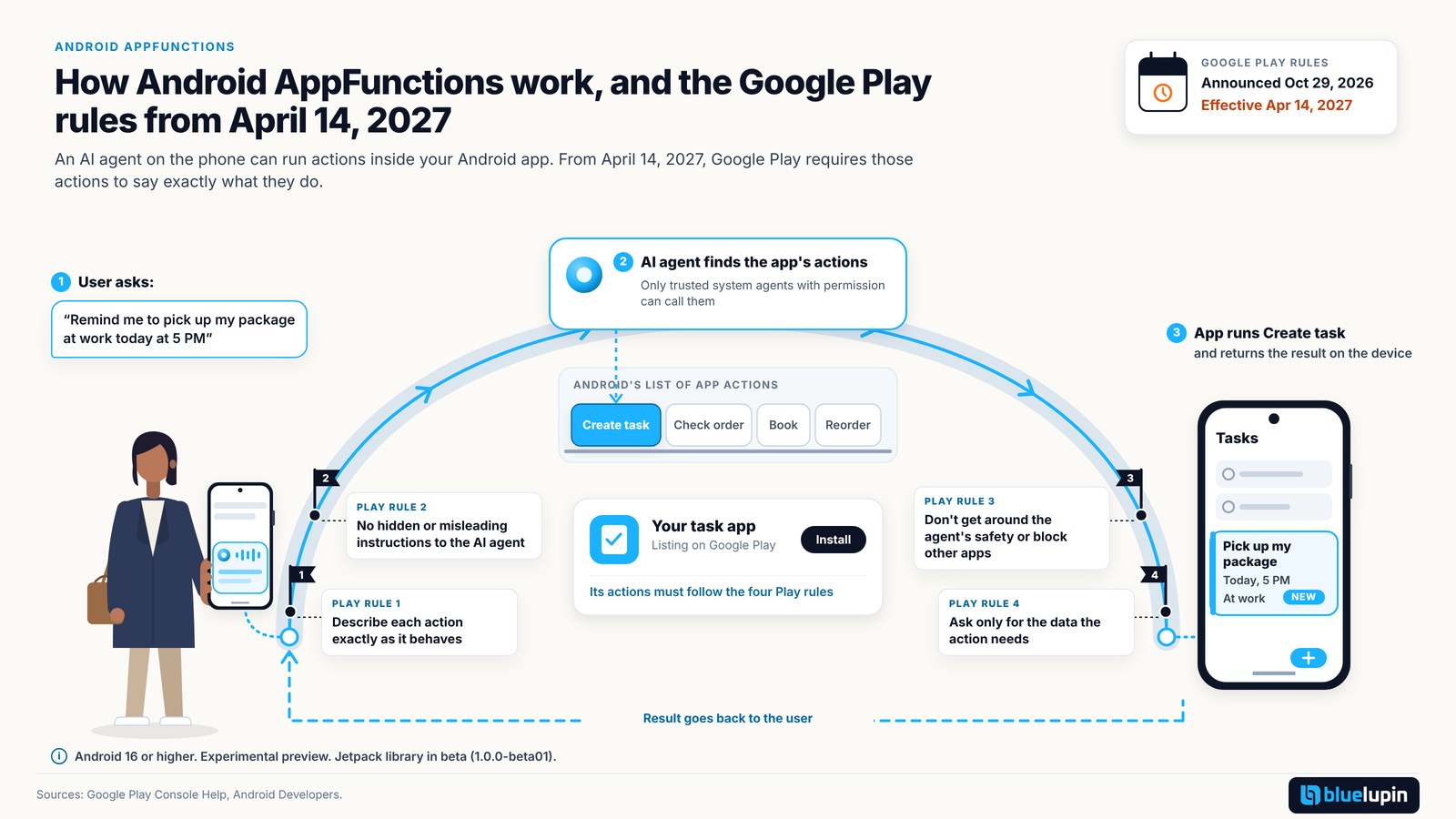
Picture a user who says to the AI assistant on their phone: “Remind me to pick up my package at work today at 5 PM.” The assistant finds a task app, creates the reminder, and fills in the title, time and place. The user never opens the app. That’s one of Google’s own examples for a feature called AppFunctions.
On October 29, 2026, Google Play announced rules for apps that offer these actions. They take effect on April 14, 2027. Here’s what AppFunctions is, where it stands, and what the rules ask.
Written as of October 30, 2026. AppFunctions is still an experimental preview, so check Google’s pages before you act. This is our plain reading of Google’s pages and is not legal advice.
Android AppFunctions is an Android platform API and Jetpack library that lets an Android app offer actions, such as creating a task or checking an order, as tools that AI agents like Gemini can call on the phone. It needs Android 16 or higher. From April 14, 2027, Google Play requires AppFunctions to describe themselves accurately and never mislead AI agents.
What AppFunctions is, in plain terms
Your app declares a few actions it can do for the user. Android keeps a list of them, and an AI agent on the phone can find and run them when asked.
Google says AppFunctions “serve as the mobile equivalent of tools within the Model Context Protocol (MCP)” (overview). MCP is an open standard that lets AI agents connect to tools and data in a consistent way. We wrote about it in MCP in practice.
How it differs from a server-side MCP server
A normal MCP server runs on your servers. Google’s FAQ puts it this way: AppFunctions “execute locally”, while “a standard MCP server is a platform-agnostic solution that relies on cloud execution and network round-trips.” So AppFunctions can use what the app already knows, without extra services outside the app. If you already have an API, the functions can call it (see our API integration work).
Who can call your functions
Not every app on the phone. Callers need the EXECUTE_APP_FUNCTIONS permission, and the API reference describes them as “trusted, system-privileged applications (referred to as ‘agents’)”. Gemini is the example Google names.
Where it stands today
It’s early. The top of Google’s overview page says: “AppFunctions is in an experimental preview as we refine the API surface, and is subject to change.” Also:
- It works on devices running Android 16 or higher.
- The Jetpack library,
androidx.appfunctions, reached 1.0.0-beta01 on October 21, 2026. There is no stable release yet. - The overview says: “As of May 2026, AppFunctions integration with Gemini is in a private preview with trusted testers.” Its FAQ adds that “only a limited number of apps and system agents can access the entire pipeline.”
- Since then, Google has published a newer guide, last updated October 27, 2026, on creating connected apps in Google Connected Console. It describes a self-service way to link your Play app to “Gemini on Android” as an Android MCP connected app.
Our reading: Google is opening a publishing path while the feature is still in preview, so don’t plan a launch date around it yet. The guide also says a connected app becomes available “to users in the countries and languages targeted by your Play app.”
This is separate from Android developer verification.
The new Google Play rules for AppFunctions
Google announced the rules on October 29, 2026, and they take effect on April 14, 2027. Both dates appear on Play Console’s Policy Deadlines table and the policy preview page. The short version from the table: AppFunctions “are strictly prohibited from deceiving or manipulating AI agents, bypassing security controls, or interfering with other applications.”
The preview page spells this out in four parts.
Describe it exactly as it behaves
Under “Accurate Representation”, the names, parameters and descriptions of your functions must match what they really do. Google’s words: “Any mismatch between described functionality and actual runtime behavior is strictly prohibited.”
No tricks aimed at the AI agent
Your functions must not use prompts or instructions meant to push the agent into “adverse actions or behaviors”. They also must not send back hidden instructions in their responses. In Google’s words: “All instructions intended for AI agents must be declared upfront during function registration or metadata ingestion.” They also can’t set rules for other apps’ AppFunctions.
Don’t get around the agent’s safety, or other apps
Functions must not get around the agent’s “security, privacy, safety, or abuse protections”, or coax out its system instructions or user data. They also must not interfere with the agent’s “ability … to select or call other apps, tools, or services”.
Ask for only the data the function needs
Inputs must be limited to “only what is required for the tool to operate”. The User Data policy still applies, and your Data safety section in Play Console has to cover data that flows through your AppFunctions. (Same idea as in our post on agent tool access without the keys.)
The rules apply to “Developers building AppFunctions”. We found nothing on Google’s pages saying an app has to add them.
Should your app add AppFunctions? A quick check
| Your app | Likely first step |
|---|---|
| Users repeat short tasks (status checks, bookings, lists) | Shortlist 3 to 5 low-risk functions |
| Mostly payments or actions that can’t be undone | Wait, and design confirmation steps first |
| Already has a public API or MCP server | Plan AppFunctions alongside it |
| Few users on Android 16 or higher | Watch and plan, with no rush |
Questions that help place your app in the table:
- Do your users repeat simple actions, like booking, checking a status, reordering or logging something?
- How many of your users are on Android 16 or higher? Your Play Console statistics will tell you. We have no general number to quote.
- Can each action run safely without the user seeing your screen? Which ones need the user to confirm first?
Good first candidates are read-only or low-risk actions. Leave payments and anything that can’t be undone until you have a confirmation step. See our post on AI agent approval gates.
How to prepare before April 14, 2027
If you decide to build:
- List the 3 to 5 actions your users would most like an assistant to do for them.
- Write each function’s name and description so they match exactly what the code does. This is the “Accurate Representation” rule.
- Cut each function’s inputs down to what it needs.
- Put every instruction for the agent in the declared metadata. Never send instructions back in a response.
- Update your Data safety section for any data that flows through the functions.
- Test on an Android 16 device. Google’s overview gives your tech lead a command to check registration.
- To appear in Gemini, follow the Google Connected Console guide: link the Play app, add the app details and example prompts, upload the app bundle, test with your testers, then release to production. Google says connected apps “are reviewed by Google alongside your Play app release”, which may make your Play app review take longer.
What we’d avoid
- Exposing payment or delete actions on day one.
- Writing marketing copy into function descriptions.
- Assuming a date for general availability. Google hasn’t given one.
- Reading this post as legal advice.
FAQ
What are Android AppFunctions?
An Android API and Jetpack library that lets apps offer actions as tools AI agents like Gemini can run on the device.
When do the Google Play AppFunctions rules take effect?
April 14, 2027. Google announced them on October 29, 2026.
Does my app have to add AppFunctions by April 2027?
We found no such requirement on Google’s pages. The rules apply to “Developers building AppFunctions”.
What do the new Play rules prohibit?
Misleading descriptions, prompts that manipulate AI agents, hidden instructions in responses, getting around agent security, interfering with other apps, and asking for more data than needed.
Which Android versions support AppFunctions?
Android 16 or higher.
How are AppFunctions different from an MCP server?
AppFunctions run locally on the device. A standard MCP server runs in the cloud.
Can Gemini use my AppFunctions today?
It is early. Google’s overview said private preview with trusted testers as of May 2026, and a newer Connected Console guide (October 27, 2026) describes linking a Play app to Gemini. Check current status first.
Want help with this?
Bluelupin builds Android apps and AI agents that use your tools and APIs. We can help you plan and build AppFunctions for your Android app, from picking the first actions to Play release. You can also read about how we build AI into existing apps.
Book a consultation or write to sales@bluelupin.com.