


Many businesses in India run an Android app that never goes near the Play Store. A dealer ordering app sent as an APK on WhatsApp, a field-staff app downloaded from a link, a kiosk build, an internal tool. Google’s Android developer verification program is going to change how phones treat those installs. Today, for apps shared this way, nothing has changed on your users’ phones. In 2027, Google says, it will.
Here’s what the program is, what’s live now, what changes in 2027 and how we’d get ready.
Written as of 24 October 2026. Google has changed the details of this program several times, so check the official page before you act. This is our plain-language reading, not legal advice.
What Android developer verification is
Android will only install an app normally if the app’s package name is registered to a developer whose identity Google has verified. Google compares it to an ID check at the airport in its August 2025 announcement: it confirms who the developer is. Google says it doesn’t review what the app does or collect its content.
The check runs on certified Android devices running Android 7 or higher, through Google Play services. Once it’s fully rolled out, it applies wherever the APK came from: Play, another store, a website or a WhatsApp message.
What is live today
Enforcement started on 30 September 2026, in four countries and for seven app stores only.
The countries are Brazil, Indonesia, Singapore and Thailand. The stores are Google Play, Samsung Galaxy Store, HONOR App Market, OPPO App Market, Xiaomi GetApps, vivo V-Appstore and Transsion Palm Store.
An APK shared directly, by link, website or WhatsApp, is not checked yet in any country. Google’s FAQ says so plainly: if users sideload your app directly, “these new verification requirements won’t apply to your app yet”. The same goes for app stores that aren’t on the list.
Some news coverage still describes an older, wider plan. Google narrowed the first phase in its June 2026 update.
2027, and India
Google says the program expands to all apps on certified Android devices worldwide in 2027. It hasn’t given a month or a country order. India isn’t named anywhere in Google’s verification pages and has no separate date, so as far as Google has said, India is part of that 2027 global rollout.
A Play deadline that has already passed
If you also publish on Google Play, a separate rule required Play apps to be registered by 30 September 2026 to avoid removal from Play worldwide. Google says most were registered automatically. It’s worth checking Play Console to make sure none of yours are flagged.
What changes for an APK you share by link or WhatsApp
Once the rule reaches your users, a registered app installs just as it does today. Users see no difference.
An unregistered app is different. It can still be installed, but only through what Google calls the advanced flow, or with ADB, a developer tool that connects a phone to a computer.
The advanced flow is a one-time setup on each phone. The user turns on developer mode, confirms nobody is coaching them, restarts, waits one day, confirms with a fingerprint or PIN, and then allows unverified installs. A warning still shows on each install. That’s manageable for an engineer and unrealistic for hundreds of dealers or field staff.
Updates matter even more. Google says updates to an unregistered app fail unless the advanced flow is on or the update goes through ADB. If your field app updates itself in the background, that’s the part that would break.
Test builds count too. In 2025 Google said test APKs shared any way other than ADB need a registered package.
| How your users get the app | Today (24 Oct 2026) | In 2027 (no month announced) |
|---|---|---|
| Google Play | Play apps had to be registered by 30 Sep 2026 | Same rule continues |
| APK by link, website or WhatsApp | Not checked anywhere | Must be registered, or users need the advanced flow |
| One of the seven listed stores | Checked in Brazil, Indonesia, Singapore and Thailand | Checked everywhere |
| Your organisation’s store on managed devices | Exempt, per Google | Exempt, per Google |
| ADB install | No change | No change |
Who registers: your company or your agency?
Registration ties two things to one verified account: the app’s package name and the key the app is signed with. Whoever holds that account and that key is, for Android’s purposes, the app’s owner.
Organisation or individual account
A business registers as an organisation. According to Google’s full distribution guide, that needs:
- A D-U-N-S number, which is free from Dun & Bradstreet but can take up to 28 days.
- A website verified in Google Search Console.
- Official organisation documents.
Individuals need government photo ID and proof of address. Google’s page gives document examples for the US only. It hasn’t published an India-specific list or a rupee fee, so check during sign-up. Google lists the fee for a full distribution account in the Android Developer Console as $25.
There is also a free limited distribution account, but it is capped at 20 devices and meant for students, hobbyists and personal use. It doesn’t suit a business app.
Which console to use
If you already publish on Play, Google says to do everything in Play Console, including apps you ship outside Play. If you only distribute outside Play, use the new Android Developer Console.
Your signing key
To register an existing app, you add the fingerprint of its signing key and upload an APK signed with the private key. Google’s FAQ is clear on one point: if you lose the key, you can’t register that package. If two parties claim the same package name, priority goes to the key behind most of the app’s known installs.
Google doesn’t describe any special role for agencies. Our own recommendation, as general guidance only: register under your company’s own organisation account, keep the signing key yourself or in a key service you control, and give your agency access to the account. If your app was inherited from an old vendor, finding that key is the first job. Our post on key and secret hygiene covers the basics of storing it safely.
Enterprise, MDM and kiosk apps
Google says apps distributed through your organisation’s store, on managed devices, don’t need verification. It still recommends registering them in case they end up on an unmanaged phone or come from another source.
That wording is narrow. Google hasn’t said whether it covers a work profile on an employee’s personal phone, or an MDM tool pushing an APK from a URL. Until it does, we’d register enterprise apps anyway. It’s one account, and then nobody has to guess.
For kiosks, installs over ADB need no registration and skip the wait. That helps when setting up a device, less so for a fleet that updates over the air. Google doesn’t say what happens on uncertified or custom Android builds, so we wouldn’t plan around that. Ask your hardware vendor whether your devices are certified.
What to do now
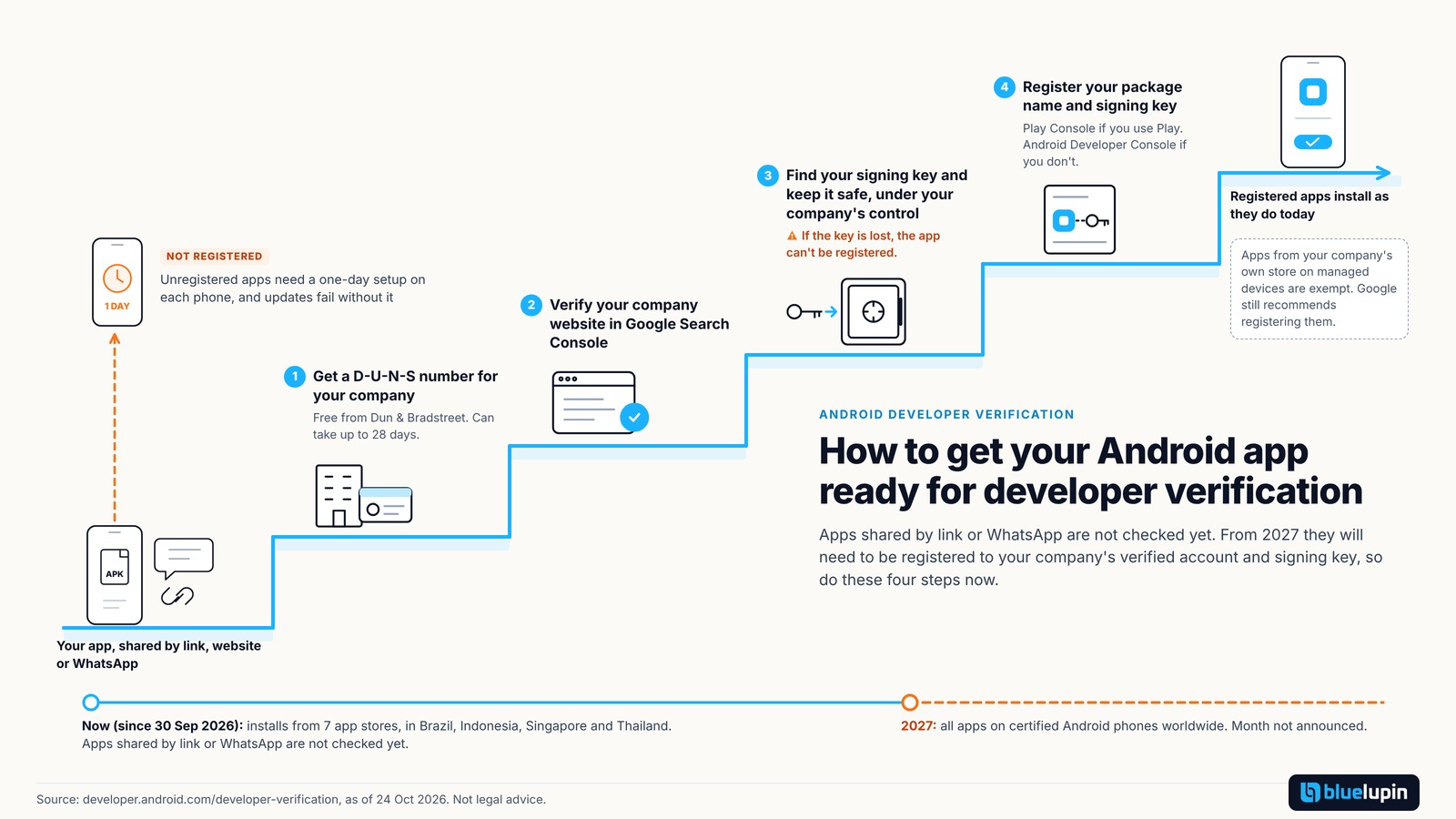
Here’s where we’d start:
- List your apps. Every Android app you ship outside Play: its package name, who signs it, how users get it, and which countries they are in.
- Find the signing keys. If an agency or former vendor holds them, get them back before you register.
- Get a D-U-N-S number if your company doesn’t have one. It can take up to 28 days.
- Pick the console. Play Console if you are on Play, otherwise the Android Developer Console. Verify your organisation and register each package, including test builds.
- Check the status. Registration status shows in both consoles, and developers can see it in Android Studio when they build.
- Register MDM apps too, and ship them through your managed store.
- Watch for the 2027 date. Put a quarterly check of Google’s page in someone’s calendar.
The effort is usually small if you have your keys and a D-U-N-S number. It grows when keys are lost, someone else registered the app, or nobody is sure which builds are in the field.
What we would avoid
- Planning on users turning on the advanced flow.
- Assuming the enterprise exemption covers every phone in your company.
- Letting an agency register your app under its own account with no handover arrangement.
- Waiting for the 2027 date before looking for your keys.
In closing
For apps shared by link or WhatsApp, nothing has changed yet. Getting ready is mostly housekeeping: an organisation account, a D-U-N-S number and your signing keys in safe hands. It’s easier to do now than in the week Google announces the 2027 date. Details are as of 24 October 2026, and this isn’t legal advice.
Bluelupin builds and maintains Android apps, including apps distributed outside Play. If you’d like help reviewing your apps, keys and distribution before 2027, talk to us.