

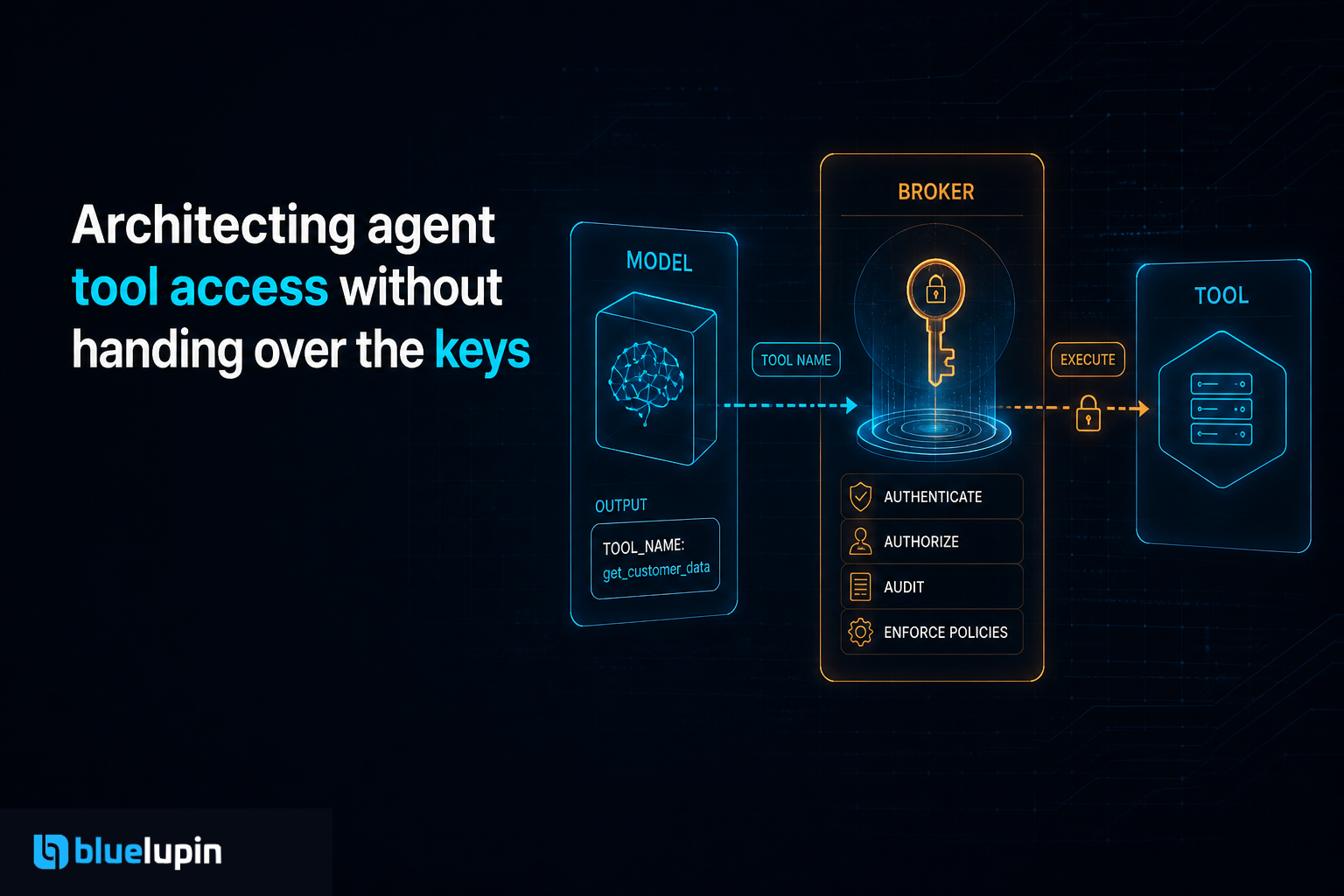
A client asked us to add an assistant inside their product. The brief was simple: let it look up orders, draft a reply, and open a ticket. Someone on the call said the fastest path was to drop a service account into the prompt and let the model figure out the rest.
We have done that version. It works on Friday and it is a problem by Monday.
The model does not need your keys. It needs a narrow door, a name on the request, and a log of what walked through. The rest is how you keep a useful agent from becoming an admin user you forgot you created.
The agent is a user, just not a human one
We already know how to treat a new engineer. They get an account. They get the repos they need. They do not get production database credentials on day one, and they do not share a password with three other people.
An agent that can call tools is the same kind of principal. It has a name (which agent, which customer, which session). It has a reason to exist. It will be wrong sometimes, and it will retry. If the only credential it holds is "whatever the backend uses", every mistake has the blast radius of the backend.
That is the part people skip when they wire MCP, function calling, or a homegrown tool router. The demo looks magical because the agent can do anything the token can do. The production question is the opposite: what is the smallest set of actions this agent is allowed to take, and who do we blame when it takes one?
Do not put secrets in the model context
The model sees the conversation, the tool results, and anything you stuffed into the system prompt. That is not a secret store.
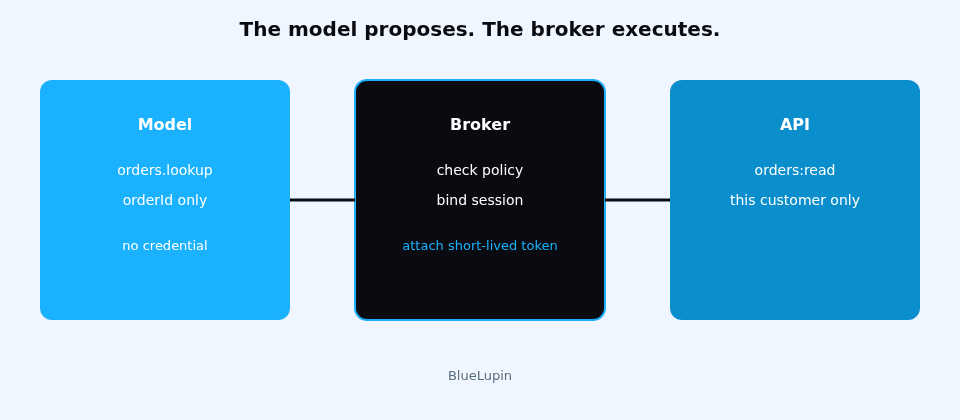
If the API key, the database URL, or the webhook signing secret is in that context, it can leak into a log, a trace, a support export, or a tool result the model later quotes back. We treat model context as untrusted storage. Credentials live in a broker the model cannot read.
The pattern we use is boring on purpose:
- The product asks the agent runtime for a tool call.
- The runtime checks policy: this agent, this user, this tool, this argument shape.
- A broker attaches a short-lived credential and calls the real API.
- The model only sees the result we chose to return.
The model proposes. The broker executes. Those are different jobs.
// the model is allowed to ask for this
{
  tool: "orders.lookup",
  args: { orderId: "ord_1842" }
}

// it never sees this
{
  authorization: "Bearer <short-lived, orders:read, customer:cus_9>"
}
If a tool needs a secret, the model names the tool. It does not hold the key.
One tool, one job, one scope
"Call any endpoint" is not a tool. It is a shell.
We write tools the way we write public module APIs. A tool has a name, a small input schema, and one outcome. orders.lookup returns a redacted order. tickets.create opens a ticket with a fixed category list. There is no http.request and there is no run_sql in a customer-facing agent unless we are prepared to review every query by hand.
Least privilege here is not a slogan. It is the schema. If the tool cannot express "delete all customers", the model cannot do that by accident. If it can, the policy layer has to catch it, and schemas catch more than prompts do.
{
  "name": "orders.lookup",
  "description": "Read one order the signed-in customer owns.",
  "input_schema": {
    "type": "object",
    "required": ["orderId"],
    "properties": {
      "orderId": { "type": "string" }
    },
    "additionalProperties": false
  }
}
additionalProperties: false is doing real work. So is binding the call to the signed-in customer, not to an id the model is free to invent. We do not trust the model to only ask for "its" customer. The broker overwrites the subject from the session.
Separate the scary tools
Some actions should not run just because the model was confident.
Refunds, password resets, sending mail to a list, changing a role, deleting a record: those sit behind a second gate. The agent can draft the action. A human, or a stricter policy, confirms it. The confirmation is not a chat message the model can talk itself out of. It is a record: who confirmed, which tool call, which arguments, at what time.
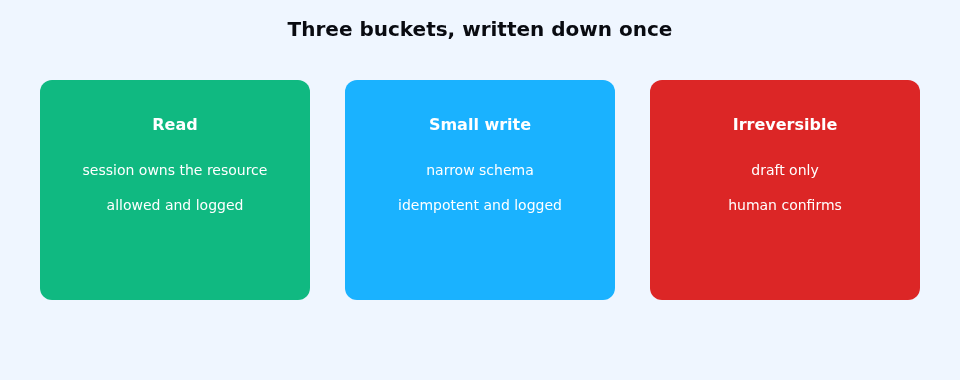
We group tools into three buckets and write the bucket down:
- Read tools. Allowed if the session owns the resource.
- Write tools with a small blast radius. Allowed, logged, idempotent.
- Irreversible tools. Draft only, until a human or a hard rule says yes.
The middle bucket is where teams argue. That is fine. Argue it once, in the policy file, not inside every prompt.
Short life, tight audience, real logs
A long-lived token on an agent is a stolen password waiting for a bug. We mint credentials per session, or per tool call, with a few minutes of life and only the scopes that tool needs. When the session ends, the credential is useless even if a log line captured it.
Every executed call writes a line we can answer a week later:
- which agent
- which human session it acted for
- which tool
- the arguments after redaction
- the result code
- the policy decision (allowed, denied, needs confirmation)
Without that line, "the bot did it" is not an incident report. It is a shrug.
We also keep deny logs. The interesting bugs are often the calls the policy refused. That is how you notice the model probing for tools it should not have.
What we stopped handing over
We stopped sharing one admin key across every agent in the product. One leak, or one bad prompt, then owns the tenant.
We stopped letting the model choose the tenant id. The session does.
We stopped treating "the model is aligned" as an access control. Alignment is a hope. A schema plus a broker is a door.
We still let agents be useful. Lookup, draft, summarize, open the boring ticket. The point is not a locked room. The point is that the keys stay with a component we can rotate, revoke, and explain to a security review without blushing.
A small checklist before the first tool ships
- Name the agent as a principal. No shared admin token.
- Define tools with closed schemas. No generic HTTP or SQL unless you mean it.
- Put secrets in a broker. The model proposes, the broker calls.
- Bind resource ids to the session, not to whatever the model typed.
- Split irreversible actions into a confirm step.
- Log the decision, including denies.
- Expire the credential when the session ends.
You can add tools after that. Retrofitting a door after the agent already has the keys is the expensive version of the same work.