


A few weeks ago we published our DPDP implementation roadmap for India-based platforms. That post is about what to build. This one is about what to show once it is built.
The question we now hear most from engineering leads: “We shipped the consent flow. What do we hand the auditor?” Or the board. The answer is the same either way: DPDP compliance evidence that a stranger can open, read, and check against production without a guided tour.
We call that bundle a proof pack. This post is the inventory we walk through with teams at Bluelupin: which artefacts belong in it, what format they should take, and who keeps them fresh.
The usual caveat stands. This is not legal advice. Bluelupin is an engineering partner for DPDP work, not a Consent Manager and not a law firm. A proof pack does not make you “certified compliant” (no such certificate exists), and we will not pretend otherwise.
A shipped roadmap is not proof yet
Here is the gap we keep running into. The consent service works. The DSR portal works. The retention jobs run every night. Then someone asks “show me that a withdrawal on 3 March actually stopped the marketing pixel,” and the room goes quiet while an engineer opens a terminal.
The work exists. The proof lives in Kibana queries, Jira comments, and one person’s memory.
Under s.6(10) the Data Fiduciary carries the burden of proving notice and consent. Auditors and directors do not want to watch you write SQL live. They want an artefact that already answers the question, dated and owned.
What a proof pack actually is
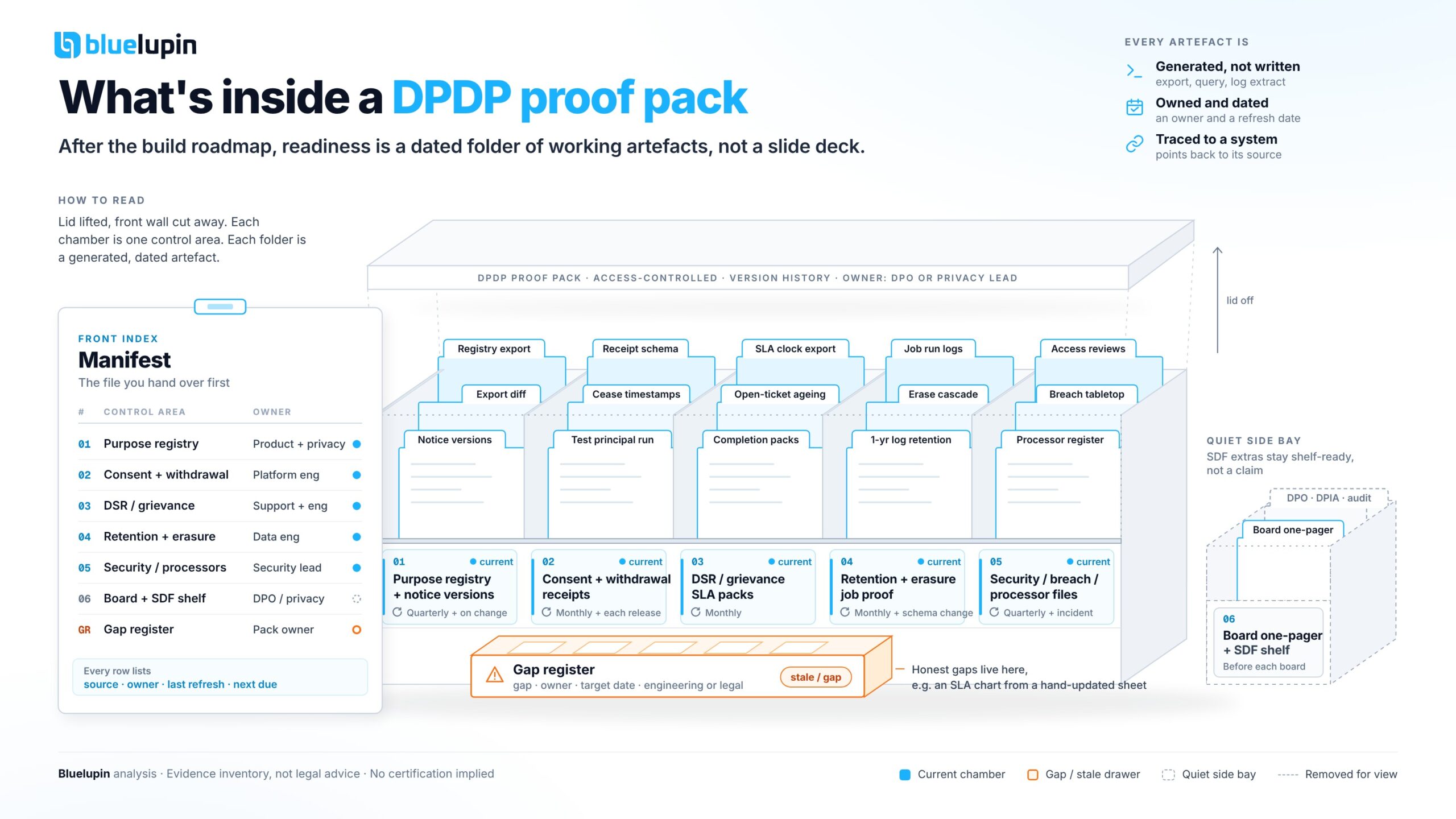
A proof pack is a folder (a real one, in a document system with access control and version history) that maps each control to the artefacts showing it ran. Not a policy PDF. Not a 40-slide deck.
Three properties make it useful:
- Every artefact is generated, not written. An export, a query result, a log extract, a signed runbook report. If a human typed it from memory, it is a claim, not evidence.
- Every artefact has an owner and a refresh date. Stale evidence is worse than none, because it tells the reader your controls stopped running.
- Every artefact points back to a system. “Consent ledger, table
consent_events, query saved asproof/consent-sample.sql” beats “see consent records.”
We structure ours around these control areas, roughly in the order auditors tend to ask.
| Control area | Artefact types | Who owns refresh | Refresh trigger |
|---|---|---|---|
| Purpose registry and notices | Registry export with lawful-ground tags, notice version history, rendered notice screenshots per locale | Product owner + privacy lead | Any new purpose, notice change, or quarterly |
| Consent and withdrawal | Ledger sample for test principals, withdrawal-to-processor cease timestamps, receipt schema | Platform engineering | Monthly sample, plus every consent flow release |
| DSR and grievance | Ticket export with SLA clocks, identity-check records, completion packs, open-ticket ageing | Support lead + engineering | Monthly |
| Retention and erasure | Job run logs, erase cascade results, processing-log retention proof | Data engineering | Monthly, plus after schema changes |
| Security, breach, vendors | Log retention config proof, access reviews, breach tabletop report, processor register with DPA links | Security lead | Quarterly, plus after any incident or new vendor |
| Board and SDF extras | One-page control status, open-gap register, DPO/DPIA/audit file if designated | DPO or privacy lead | Before each board meeting |
Purpose registry and notice versions
Start here, because every other artefact references a purpose id.
What goes in the pack:
- A dated export of the purpose registry: purpose id, description, data categories, lawful ground (consent or a specific s.7 use), retention trigger, processors, and the product owner.
- A diff against the previous export. Auditors love diffs. They show the registry is alive and that someone reviewed what changed.
- Notice version history: version id, effective date, and a rendered screenshot of each version in each language you actually ship (including any Eighth Schedule languages you offer).
Screenshots go stale fast and nobody enjoys taking them. We script them with a headless browser in CI against staging, keyed to the notice version id.
Consent, withdrawal, and receipt logs
Do not export the whole consent ledger. Nobody can read it, and you have copied personal data into a folder with looser access than production.
Instead, keep two or three test principals (synthetic accounts, clearly labelled) and run a scripted lifecycle against them each month: grant, partial withdraw, full withdraw. Then export:
- The receipt for each event (principal token, purpose ids, notice version, timestamp, channel, locale).
- The cease timestamps from each downstream processor and pixel after withdrawal.
- The receipt schema itself, so a reviewer knows what fields to expect.
The limitation: test principals prove the pipeline works, not that every real record is correct. Pair the sample with an aggregate query (withdrawals versus cease confirmations, by processor) so gaps show up as numbers.
DSR and grievance evidence
The 90-day grievance clock in Rule 14(3) is the easiest thing in the pack to verify and the easiest to fail quietly.
Include:
- A ticket export for the period with received, acknowledged, identity-verified, and closed timestamps.
- An ageing view of open tickets. A board member will look at the oldest one first.
- Two or three redacted completion packs: what systems were searched, what was returned or erased, and the response sent to the principal (with the published contact on it, as s.8(9) and Rule 9 expect).
- A short note on the identity verification method and how many requests failed it.
If your SLA chart comes from a hand-updated spreadsheet, say so and put the fix on the gap register. An honest gap beats a pretty chart that disagrees with the ticket system.
Retention, erasure, and processing-log retention proof
Retention is where “the job runs nightly” needs to become “here is what the job did.”
Artefacts we include:
- Job run logs for purpose-end and withdrawal erasure, with counts per system and per run.
- Erase cascade results showing which downstream systems (warehouse, search index, backups policy, vendors) confirmed deletion and which did not.
- Proof that processing logs are themselves retained for the minimum period where Rule 8(3) applies (at least one year): the retention config from your log platform, plus a sample query returning an entry close to the one-year mark.
Teams find that last item paradoxical: erasing personal data while keeping logs about processing it. Show both side by side so nobody has to reconcile them in a meeting.
Backups are the awkward spot. If your position is “backups expire on a fixed cycle and restores are re-filtered,” record it as a dated, owned decision.
Security, breach, and vendor files
If ISO 27001 or SOC 2 work already produced some of this, reuse it and map it to DPDP rather than duplicating it.
What we look for:
- Security log retention: config evidence that security-relevant logs are kept for at least one year (Rule 6), not just a policy line saying so.
- Access reviews: the last quarterly review export for systems holding personal data, with sign-off.
- Breach tabletop report: a dated exercise with timestamps for detection, principal notification draft, Board intimation draft, and the detailed 72-hour Board pack draft (Rule 7). The timestamps matter more than the narrative.
- Processor register: every processor and SDK, the DPA link, the erase-on-instruction clause, and the breach escalation contact. Mark the ones where kill-switch evidence exists and the ones where it does not.
Tabletops cost half a day of senior time, and teams skip them once the first one goes well. Put the next date in the pack so a slip is visible.
Board and SDF extras
When we say “board” in this post we usually mean your own board of directors, not the Data Protection Board of India. Directors do not need the full folder. They need to know whether the controls are running and where the gaps are.
What works for us is one page, generated from the pack:
- Each control area with a status (current, stale, gap) and the date of its newest artefact.
- The open-gap register: gap, owner, target date, and whether it is engineering or legal.
- Any incidents or tabletop findings since the last meeting.
That page is the board-ready evidence. The folder behind it is what an auditor opens if they doubt the page.
If your organisation might be notified as a Significant Data Fiduciary, keep a separate subfolder ready but quiet: the DPO appointment and published contact, a DPIA method and the latest DPIA, and the scope and findings of an independent data audit. SDF status comes by Government notification under s.10, so we treat this as shelf-ready, not a claim. Counsel should decide when it activates.
How to assemble and refresh the pack
The first pack takes longest, mostly because it surfaces things nobody owned. After that, it is maintenance.
- Name one pack owner. Usually the DPO or privacy lead. They do not produce every artefact; they chase the people who do.
- Automate the exports you can. Registry export, consent sample, ticket export, and job logs can all run on a schedule and drop into the folder with a date in the filename.
- Keep a manifest. A single index file listing each artefact, its source system, owner, last refresh, and next due date. The manifest is what you hand someone first.
- Redact by default. The pack should hold tokens and counts, not names and phone numbers. If an auditor needs a real record, pull it live under access control.
- Run a dry review. Once a quarter, have someone outside the team open the pack cold and try to answer five questions from it. Wherever they get stuck is your next fix.
The cost is real: some engineering time to wire the exports and a recurring slot for the owner. In return, an audit request stops being a scramble.
A folder of working artefacts, not a deck
The best proof packs are boring: dated files, a manifest, an honest gap register, and a one-page summary nobody had to design.
If you have built the controls from the DPDP roadmap, the pack is the next step: turning working systems into evidence someone else can trust.
If your team wants a working session on that, Bluelupin can sit with engineering, product, and privacy leads and walk the artefact list against your stack: which exports already exist, which are missing. We will not certify you compliant. We will help you find the gaps before an auditor does.
Again, this is not legal advice. Engage counsel on SDF status, children’s data, cross-border questions, and anything you plan to say publicly about compliance.