

Updated October 2026
Choose off-the-shelf software when a ready-made product already covers most of your process and the gaps can wait. Use low-code, or extend the product with integrations, when you need a few changes. Build custom software when the process sets your business apart, your tools cannot connect, or you plan to sell the software.
We first wrote this post in 2024 as a decision tree, and it mixed up what custom and rented software give you. This version covers three routes, the costs to count, and the ownership and data questions people ask too late.
Custom, off-the-shelf and low-code: what each one means
Off-the-shelf software is a ready-made product that many businesses use. Today it’s usually SaaS (software as a service): you pay a subscription, often per user per month, and the vendor hosts it and decides what goes into the next version.
Low-code is a platform where you put together an app from ready building blocks, with little programming, inside the platform’s limits.
Custom software is built for one business and its own process. That’s the main difference in custom software vs SaaS: with SaaS you rent the same product as everyone else, and with custom software you decide what it does and when it changes.
Whether it runs in the cloud or on your own servers is a separate decision, and we wrote about cloud or on-premise in another post.
Is custom software right for you? Five questions to answer first
Answer these before you compare vendors or prices.
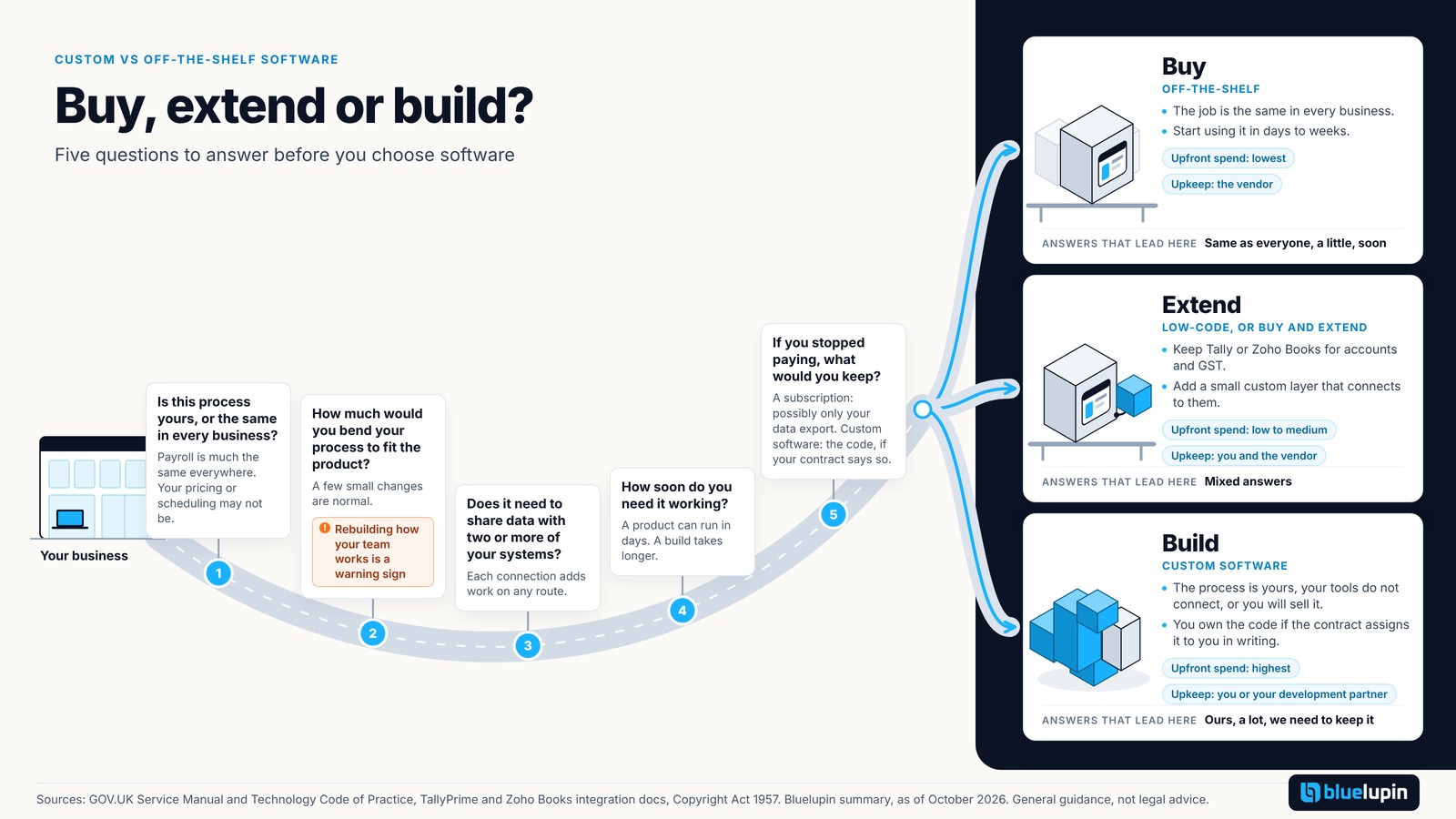
- Does this process set you apart, or is it the same in every business? Payroll is much the same everywhere. Your pricing or scheduling may not be.
- How much would you bend your process to fit the product? A few small changes are normal. Rebuilding how your team works is a warning sign.
- Does it need to share data with two or more of your systems? Each connection adds work on any route.
- How soon do you need it working? A product can run in days. A build takes longer.
- If you stopped paying tomorrow, what would you keep? With a subscription, possibly only your data export. With custom software, the code, if your contract says so.
Answers like “same as everyone”, “a little” and “soon” point to buying. “Ours”, “a lot” and “we need to keep it” point to building. Mixed answers usually mean the middle route.
Buy, extend or build: the three routes compared
Build vs buy software is really a choice of three routes, and the middle one often suits small and mid-size businesses.
| Off-the-shelf (buy) | Low-code or buy and extend | Custom (build) | |
|---|---|---|---|
| Time to start using | Days to weeks | Weeks | Weeks to months |
| Upfront spend | Lowest | Low to medium | Highest |
| How cost grows | With users, modules and plan tiers | With platform licenses and the extra pieces you add | With changes and maintenance you choose |
| Fit to your process | You adapt to it | Partly adapted | Built around it |
| Integrations | What the vendor supports | The product’s published connectors and APIs | Whatever you scope and pay for |
| Who maintains it | The vendor | Split between you and the vendor | You or your development partner |
| Who owns the code | The vendor | The vendor owns the platform; you own your data | You, if the contract assigns it to you in writing |
| Leaving later | Depends on data export | Depends on export and how much logic lives in the platform | Easier if you hold the code, documentation and accounts |
| Good choice when | The job is the same in every business | You need a few changes or one connection | The process is yours, tools do not connect, or you will sell it |
Running an online store? See custom vs off-the-shelf for online stores.
When off-the-shelf is the better choice
Buy when the job is common: accounts, payroll, email, a basic CRM. A good product carries years of other customers’ feedback, and you can start this week. You trade fit for speed and a low start.
Low-code vs custom software, and the buy-and-extend route
Low-code suits simple internal workflows, like an approval form or a field checklist. We cover low-code tools with AI separately.
Many Indian businesses already run Tally or Zoho Books, so buy and extend is often a practical route. Keep them for accounts and GST, and add a small custom layer that talks to them through their published integrations (an API is a published way for other software to read and write data). You build only the part that is yours.
When to build custom software
Build when the process is what makes you different, when your team spends hours copying data between tools, or when you plan to sell the software. AI coding tools can speed up routine work on small builds, as long as the work goes through a reviewed process (see how AI coding tools change small builds). Many SaaS products now ship AI features too, so check those first.
The real cost: compare totals over time
Custom software usually costs more upfront. The harder part is comparing both sides over the same period, say three or five years. The UK government’s technology guidance says to look at the total cost of ownership and reduce the chance of lock-in to long contracts.
Count these on each side:
- Subscriptions, per user and per module, and how they grow as you add people
- Implementation and setup
- Moving your existing data across
- Training your team
- Integrations with the systems you already run
- Maintenance, upgrades and hosting
- The hours your team spends on workarounds today
That last line is the one people forget. Three people each spending an hour a day on workarounds is a real cost, even with no invoice. If you want to see what a build involves, here is how we build custom software around your process.
Ownership, data and leaving later
This section is general information, not legal advice. Talk to your lawyer before you sign.
Can you get your data out?
Before you buy, check that you can export all of your data in a usable format. The UK government guidance says you should always have full control of any data you store.
Who owns custom code?
Paying for software doesn’t automatically make you the owner. Under India’s Copyright Act, the author of a work is its first owner, unless the author is your employee working under a contract of service, or a written agreement says otherwise. An assignment of copyright is valid only in writing. So the contract decides who owns the code. We put the contract points to check in outsourcing vs in-house software development.
Personal data under DPDP
If your software holds customers’ personal data, India’s DPDP Act keeps you responsible for it even when a vendor or developer processes it for you, under a valid contract. These duties apply from 13 May 2027. We explain what DPDP means for platforms before May 2027.
A low-risk way to test custom software
If you’re unsure, start small. Pick one process, agree on a signed scope and a fixed price, and see how a custom build fits your team. Our Blitz Platform is one example: an app for one business process, from $2,999, in 4 weeks. You can read about a small fixed-price build for one business process there.
Custom vs off-the-shelf software: FAQs
What is the difference between custom software and SaaS?
SaaS is one product many businesses rent, usually per user per month, and the vendor runs and updates it. Custom software is built for one business and changes when that business decides.
Is low-code a good middle ground?
Often, for simple internal workflows. Tools such as Microsoft Power Apps let you build business apps that connect to data you already hold. The limits appear when the logic gets complex or you need deep integrations.
Can I keep Tally or Zoho and add custom software around it?
Yes, and it’s often a practical route. TallyPrime supports integration through JSON, XML and ODBC, and Zoho Books has a REST API, so a custom layer can read and write their data. Agree on which records sync and how often.
What happens to my data if I leave a SaaS product?
It depends on the product’s export options and your contract. Before you buy, check that you can export all your data in a usable format.
Does India’s DPDP law affect the build or buy choice?
Not by itself. If you decide why and how customers’ personal data is used, you stay responsible even when a vendor processes it, under a valid contract. These duties apply from 13 May 2027. This is not legal advice.
What comes next
If you’re leaning toward custom, the next question is who builds it. We cover that in outsourcing vs in-house software development.
Sources
- GOV.UK Service Manual, Choosing technology: https://www.gov.uk/service-manual/technology/choosing-technology-an-introduction
- GOV.UK Technology Code of Practice: https://www.gov.uk/guidance/the-technology-code-of-practice
- Microsoft Power Apps overview: https://learn.microsoft.com/en-us/power-apps/powerapps-overview
- TallyPrime integration: https://help.tallysolutions.com/integrate-with-tallyprime/
- Zoho Books API: https://www.zoho.com/books/api/v3/introduction/
- Copyright Act 1957, sections 17 and 19: https://www.copyright.gov.in/Documents/Copyright_Act_1957.pdf
- Digital Personal Data Protection Act 2023, section 8: https://www.meity.gov.in/static/uploads/2024/06/2bf1f0e9f04e6fb4f8fef35e82c42aa5.pdf
- Digital Personal Data Protection Rules 2025: https://www.meity.gov.in/static/uploads/2025/11/53450e6e5dc0bfa85ebd78686cadad39.pdf
- Bluelupin Blitz: https://bluelupin.com/blitz