


Updated 27 October 2026. Google and legal items below are as of October 2026.
For a lot of customers, your website is the first place they check you out. They want to know what you do, whether you serve their area, and how to reach you. If the site makes that hard, they’ll call someone else. That’s why we keep a short list of small business website do’s and don’ts.
Below are the eight pairs, updated for 2026, with a source for every rule. The privacy and accessibility parts are general information, not legal advice.
The eight pairs at a glance
| # | Do | Don’t |
|---|---|---|
| 1 | Say what you do and how to reach you on the first screen | Hide contact details or add many competing buttons |
| 2 | Design for phones first | Test only on your own phone |
| 3 | Check Core Web Vitals | Load huge images and autoplay video |
| 4 | Serve every page over HTTPS | Let certificates or the domain lapse |
| 5 | Build it so everyone can use it | Put key text inside images |
| 6 | Collect only the data you need | Copy another site’s privacy policy |
| 7 | Answer customers’ real questions | Stuff keywords or write to a word count |
| 8 | Keep content and your Google listing current | Launch and forget |
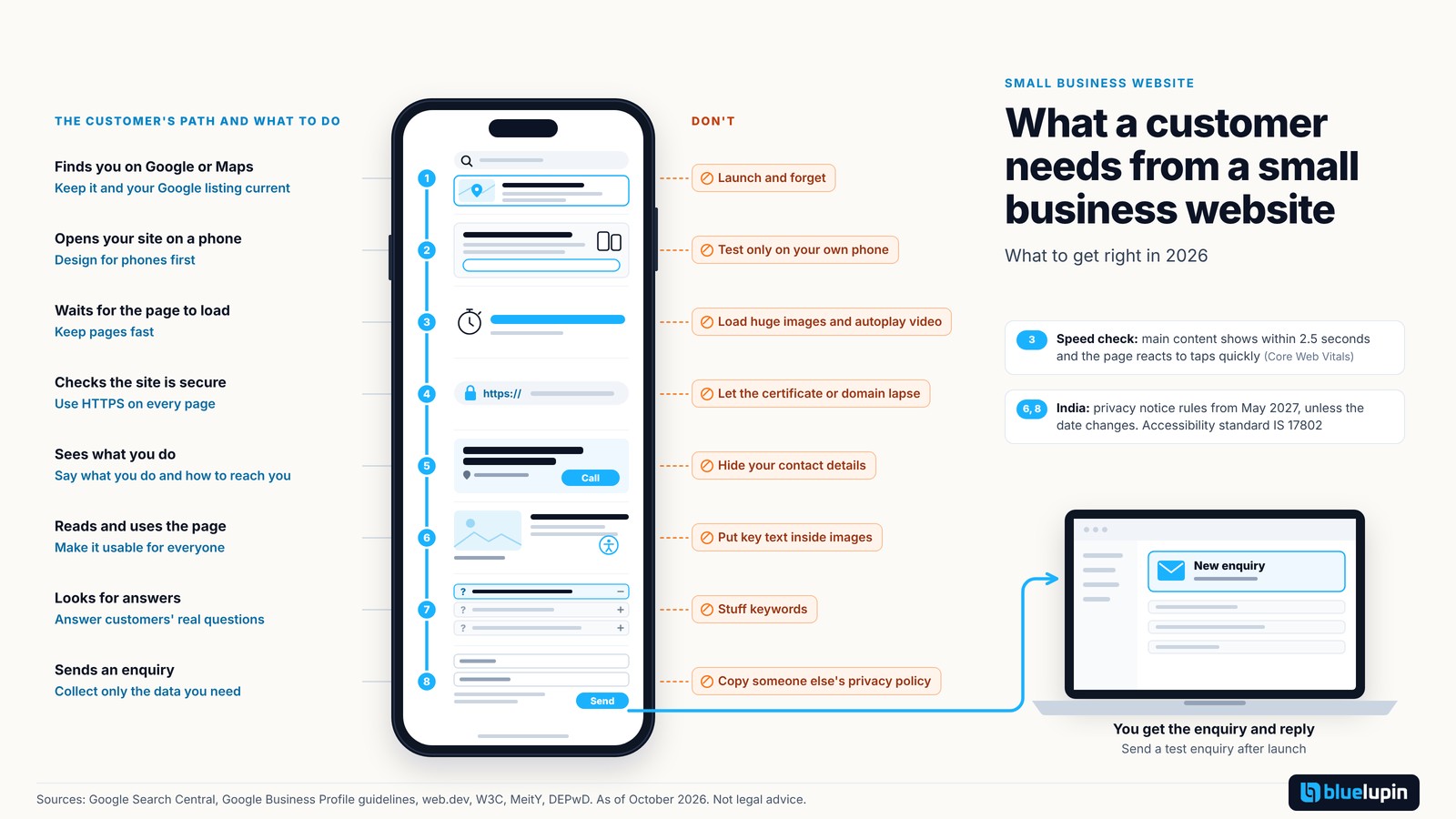
1. Do say what you do on the first screen. Don’t make people hunt for how to reach you.
The first screen should answer two questions: what do you do, and how do I contact you? One headline that names your service and the area you serve does most of the work.
Pick one main action, such as call, WhatsApp or an enquiry form, and make it easy to see. On phones, the number should be tap-to-call. Keep forms short. Ask only what you need to reply.
Avoid five buttons fighting for attention, a ten-field form, or contact details that only appear in the footer. And send a test enquiry after launch. A form that never reaches your inbox loses you leads without you knowing.
2. Do design for phones first. Don’t test only on your own phone.
Google uses the mobile version of your site for indexing and ranking (Google Search Central). So treat the phone version as the main one.
Text should be readable without zooming, and buttons should be easy to tap with a thumb. Test on a low-cost Android phone and in at least two browsers, as well as on your own phone. Our post on responsive design goes into more detail.
3. Do keep pages fast and check Core Web Vitals. Don’t load huge images and autoplay video.
Google measures page experience with three Core Web Vitals (web.dev):
| Metric | What it measures | Good score |
|---|---|---|
| Largest Contentful Paint (LCP) | How fast the main content shows | Within 2.5 seconds |
| Interaction to Next Paint (INP) | How fast the page reacts to taps and clicks | 200 milliseconds or less |
| Cumulative Layout Shift (CLS) | How much the layout jumps while loading | 0.1 or less |
INP replaced the older First Input Delay metric on 12 March 2024 (web.dev). You can check any page in PageSpeed Insights or in Search Console. The usual culprits are oversized photos, autoplay videos and too many third-party scripts. Our post on how to improve website speed has practical fixes.
4. Do serve every page over HTTPS. Don’t let the certificate or domain lapse.
HTTPS protects what visitors type into your forms, and browsers are getting stricter about it. Google announced that with Chrome 154 in October 2026, Chrome turns on “Always Use Secure Connections” by default and asks the user before opening a public site without HTTPS (Google Online Security Blog).
Make sure every page loads over HTTPS. Then set the certificate and the domain to renew automatically, with reminders going to an email address someone actually reads. A lapsed certificate puts a warning in front of every visitor. Our post on web security basics covers the rest.
5. Do build it so everyone can use it. Don’t put key text inside images.
WCAG 2.2 is the current W3C standard for accessible websites (W3C). In India, the RPwD (Amendment) Rules 2023 say websites and apps must comply with IS 17802. In November 2024 the Supreme Court asked the government to frame mandatory rules (judgment), and draft rules followed in July 2026. They aren’t final yet.
Start with the basics: alt text on images, enough colour contrast, a site that works with a keyboard, labels on every form field, and captions on videos. Don’t put prices, offers or opening hours only inside an image, because screen readers and search engines can’t read it. Our post on accessibility rules in India and our WCAG checklist (written for WCAG 2.1) go further.
6. Do treat enquiry data with care. Don’t copy someone else’s privacy policy.
Every name, phone number and email in your contact form is personal data. Collect only what you need to reply.
The DPDP Rules 2025 ask for three things that matter here. You need a notice in clear, plain language that lists the data you collect and why. You need to publish a contact for privacy questions on your site. And you need reasonable security, such as strong passwords, backups and updated plugins. These rules come into force in May 2027, unless the government changes the date, so there’s time to plan.
A privacy policy copied from another business won’t describe what you actually do. If you serve visitors in the EU, GDPR may also apply. Our DPDP implementation roadmap explains the steps.
7. Do write for customers’ real questions. Don’t stuff keywords or write to a word count.
The best pages answer what customers ask you on calls: prices or price ranges, areas you cover, how long a job takes, what happens next. Give every page its own title and description, and set up Search Console so you can see what people search for.
For keyword ideas, use Keyword Planner, which is part of Google Ads (Google). Use those words naturally. Google’s spam policies list keyword stuffing as spam (Google), and Google says it has no preferred word count (Google).
What about AI answers? Google says there are no extra requirements to appear in AI Overviews or AI Mode, and the usual SEO basics apply (Google).
8. Do keep it current and visible locally. Don’t launch and forget.
Set up a Google Business Profile, and keep your name, address and phone number the same there as on your site. Google publishes guidelines for representing your business.
Update prices, services, team and photos when they change. Once a month, check that forms work and links still open. Name one person who owns renewals. Don’t leave a “coming soon” page live or a blog on the home page that stopped in 2022.
Getting a site built for a fixed price
If you’re starting fresh, a fixed-price business website can be a simple way to begin. Our Blitz Site plan is a business website from $999 in 2 weeks: up to 8 pages, admin access, up to 2 enquiry forms, Google Analytics setup, a mobile-friendly design, HTTPS setup, an accessibility check, a privacy notice, speed targets, 2 revision rounds and 3 months of hosting and bug support within the plan’s usage limits. You provide the logo, copy and images. Online checkout, member logins and advanced animations aren’t included, and the scope is signed before the build starts.
If you’re not sure whether you need an app or a website, our guide to native vs hybrid vs web apps can help.
In closing
You don’t need to fix all eight at once. Pick two or three for this month, starting with the first screen and your contact form. Google and legal items here are as of October 2026.
Bluelupin builds websites for businesses through our web development team. If you’d like a second opinion on your site, talk to us.