


Updated 27 October 2026. Platform rules below are as of October 2026.
If you’re thinking about an app for your business, the first question is usually “which kind?” Today there are four realistic options: a web app (often a PWA), a cross-platform app, a native app, and a WebView hybrid. Native vs hybrid vs web apps was the old way to frame it, and cross-platform frameworks have since changed it.
In this post we explain each option in plain words, compare them, and share the questions we’d ask before choosing. We won’t quote cost figures, because those depend on scope. We list what drives the cost instead.
The short answer
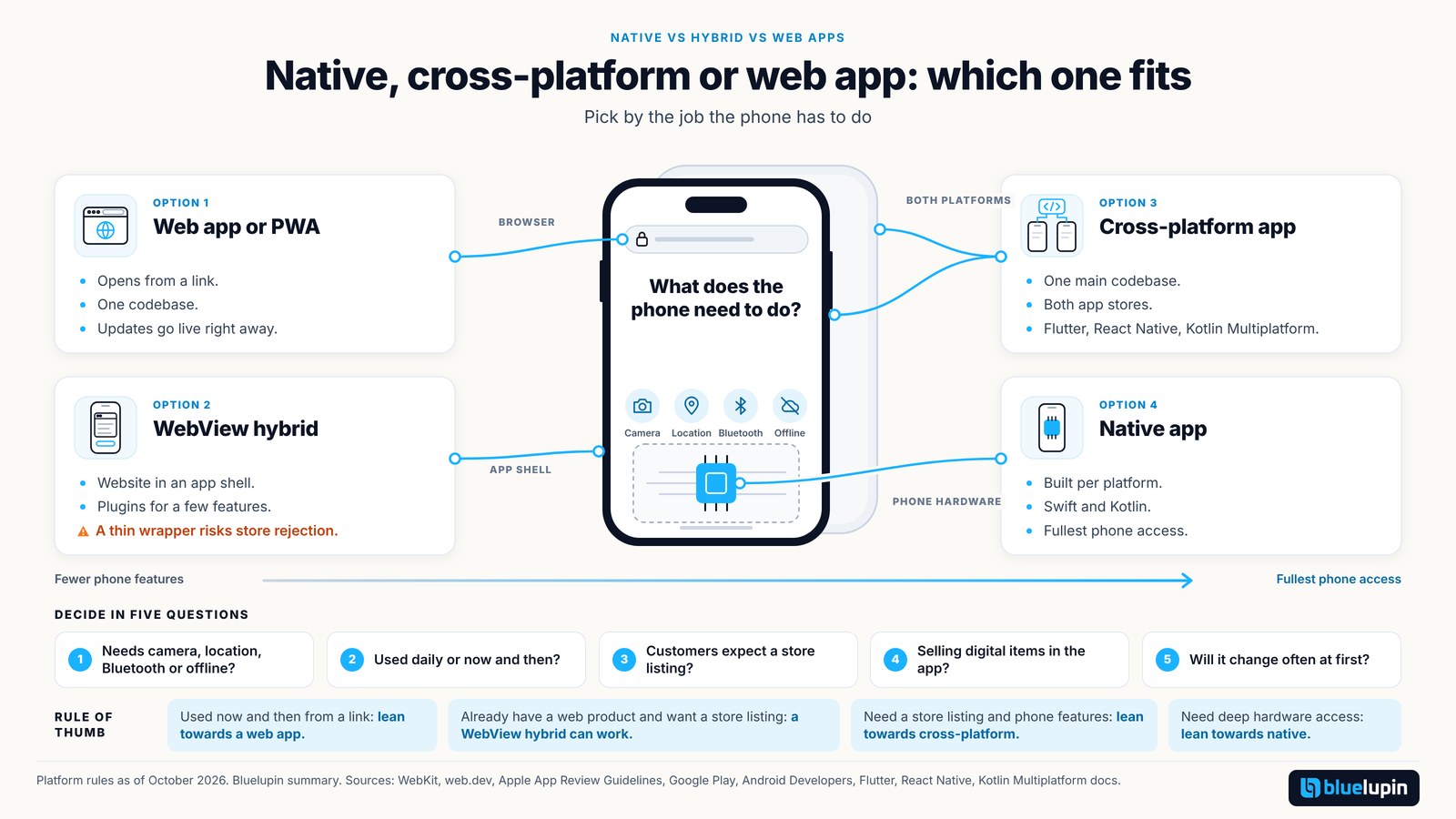
For most business apps, the choice comes down to three options. A web app or PWA runs in the browser and can be added to the home screen. A cross-platform app is built once with a framework such as Flutter or React Native and shipped to both app stores. A native app is built separately for each platform, costs the most, and gives the deepest access to the phone.
Start with what your users need to do on their phone, then pick the technology to fit.
The four options in plain words
Web app and PWA
A web app runs in the browser, on phones and computers, from one codebase. A progressive web app (PWA) is a web app that can be added to the home screen and feel more like an app, with features such as offline pages and notifications (web.dev). Updates go live as soon as you deploy, with no store review.
Web apps on iPhone can do much more than they used to. Since iOS 16.4, web apps added to the Home Screen can send push notifications (WebKit). On iOS 26, every website added to the Home Screen opens as a web app by default (WebKit). Browser apps still get fewer phone features than store apps, though. Our older post covers what a PWA can do.
Cross-platform app
A cross-platform app is a real store app for both iPhone and Android, built mostly from one codebase. The three common choices:
- Flutter, Google’s open-source framework for building apps for several platforms from a single codebase.
- React Native, which made its newer architecture the default in version 0.76 (React Native blog). We wrote about React Native for cross-platform apps earlier.
- Kotlin Multiplatform, whose shared interface toolkit, Compose Multiplatform, was declared stable for iOS in May 2025 (JetBrains). See our earlier Kotlin Multiplatform post.
Your team still needs some iOS and Android knowledge, because a few features always need platform-specific code.
Native app
A native app is built separately for each platform with its own tools: Swift for iOS and Kotlin for Android. That means two codebases, or two builds to keep in step. In return you get the fullest access to the phone and the most platform-like feel. If you’re only building for one platform first, our post on choosing between Android and iOS first can help.
WebView hybrid
A WebView hybrid is a website inside an app shell, with plugins for a few phone features. It can make sense when your web product already exists and you want a store listing. Be careful with thin wrappers. Apple’s App Review Guideline 4.2 says an app “should include features, content, and UI that elevate it beyond a repackaged website” (Apple). Our post on why apps get rejected has more on review.
How the four options compare
| Web app or PWA | Cross-platform app | Native app | WebView hybrid | |
|---|---|---|---|---|
| Built with | Web technologies | Flutter, React Native or Kotlin Multiplatform | Swift (iOS), Kotlin (Android) | Web content in an app shell |
| How users get it | A link; can be added to the home screen | App Store and Google Play | App Store and Google Play | App Store and Google Play |
| Codebases | One | One main codebase, some platform code | One per platform | One web codebase plus a shell |
| Updates | Live when you deploy | Store review for app releases | Store review | Web parts live; the shell needs store review |
| Phone features | Browser features only; fewer on iPhone | Broad, through the framework | Full | Through plugins |
| Store fees on digital sales | No store involved | Store rules apply | Store rules apply | Store rules apply |
| Watch out for | Fewer phone features on iPhone | Still needs platform knowledge | Two builds to maintain | Rejection as a “repackaged website” |
This is our summary as of October 2026. It isn’t a performance benchmark.
Decide in five questions
These are the questions we’d ask first:
- Does the app need the phone itself? Camera scanning, background location, Bluetooth or working offline all push you towards a store app.
- Will people use it daily or now and then? Occasional use suits a web app. Daily use makes a home screen icon and notifications more valuable.
- Do customers expect to find you in the App Store or Google Play?
- Will you sell digital content or subscriptions inside the app? Store fees then apply.
- How often will it change in the first few months? Frequent changes are easier on the web, where updates skip store review.
A simple rule of thumb: occasional use and traffic from links lean towards a web app or PWA. Store presence and phone features lean towards cross-platform. Deep hardware or platform features lean towards native.
What the app stores and Android now ask of you
Accounts, fees and review
Google Play charges a US$25 one-time registration fee (Google). Google says 99% of developers who pay a service fee are eligible for 15% or less, and the rates now vary by region and transaction type (Google). Apple’s Small Business Program charges a 15% commission on paid apps and in-app purchases for developers who earned up to US$1 million in the previous year (Apple). Apple also has an annual developer program fee.
The Google Play testing rule
If your personal developer account was created after 13 November 2023, you must run a closed test with at least 12 testers, opted in for at least 14 days, before you can publish (Google). Plan those two weeks into your launch.
Yearly updates on both stores
You don’t build an app once and leave it. From 31 August 2026, new Play apps and updates must target Android 16 (API level 36) or higher (Google). Since 28 April 2026, App Store uploads must be built with Xcode 26 or later using the iOS 26 SDK (Apple). Budget for this upkeep every year.
Android developer verification in 2027
Since 30 September 2026, Google checks that apps installed from participating app stores in a few countries come from a verified developer, and it says the checks roll out globally in 2027 (Android Developers). APKs shared directly by link or WhatsApp aren’t checked yet. If you share apps outside Play, our post on Android developer verification explains what to prepare.
Basics to plan for any option
Whichever option you choose, plan for these things.
Privacy. If the app collects names, phone numbers or locations, plan your DPDP notice and security work now. The core duties under the DPDP Rules start in May 2027 unless the government changes the date. Our DPDP implementation roadmap and our post on PII tokenization go further.
Accessibility. The RPwD (Amendment) Rules 2023 name IS 17802 for websites and apps, and stricter draft rules aren’t final yet. See our post on accessibility rules in India.
One backend. A single API that serves your web app and any store apps keeps your later options open. We cover this in one backend for web and apps.
What drives the cost. Five things move the price most: how many platforms you build for, how many other systems the app connects to, whether it has to work offline, what the app stores ask of you, and the yearly upkeep to keep up with new iOS and Android rules.
The privacy and accessibility notes are general information, not legal advice.
Starting small with a fixed scope
Many first builds only need to handle one business process well, such as orders, approvals or a client portal. If that’s you, a fixed-price business app can be a sensible first step. Our Blitz Platform plan builds one business process, from $2,999 in 4 weeks, as mobile-friendly web or as an app for iOS or Android (one platform) plus a web admin. We build that app cross-platform, so adding the second platform later is simpler. A second mobile platform is a listed add-on, and scope is signed before the build starts. Offline mode, multi-tenant systems and ERP integration are outside Blitz and need a custom quote. If you only need a website, Blitz Site is a business website from $999 in 2 weeks, and our small business website do’s and don’ts are a good place to start.
In closing
To sum up, a web app or PWA covers more than it used to, cross-platform frameworks have matured, and native still wins for deep phone features. Whatever you pick, plan for store rules, yearly updates, privacy and accessibility. Platform rules here are as of October 2026.
Bluelupin builds web apps, PWAs and mobile apps for businesses. If you’d like help choosing, talk to us.