Your Mobile App is Trash – Fix These Mistakes Before Users Delete It

You pour time, effort, and money into developing a mobile app, but after launch, it barely gains traction. Downloads trickle in, engagement is low, and reviews point out frustrating issues. The reality is, most mobile apps fail because they ignore what users actually need. Instead of focusing on flashy features, the key to success lies in usability, performance, and continuous improvement.
If you’re serious about building a mobile app that people love and actually use, here’s what you should focus on:
1. Define Your Audience Before Writing a Single Line of Code
Before development begins, understand who your users are. What problems do they face? How do they use their phones daily? What features truly add value to their lives? Skipping audience research leads to an app that doesn’t resonate, making it irrelevant from the start.
How to do it right:
- Conduct user interviews and surveys.
- Analyze competitors and identify gaps in the market.
- Build user personas to guide design and development decisions.
2. Solve a Real Problem Instead of Just Building Features
An app that tries to do everything ends up doing nothing well. Users are looking for solutions to specific problems, not a cluttered interface with redundant features. If your app doesn’t address a clear need, it won’t stay on their phones for long.
How to do it right:
- Identify a single core problem and focus on solving it effectively.
- Prioritize essential features and avoid unnecessary complexity.
- Keep refining the app based on user feedback rather than assumptions.
3. Make the User Experience (UX) Seamless and Intuitive
No one wants to deal with an app that is confusing, clunky, or overloaded with unnecessary elements. If users struggle to navigate your app within the first few seconds, they won’t stick around.
How to do it right:
- Keep the design clean and intuitive.
- Follow platform-specific UI guidelines (Material Design for Android, Human Interface Guidelines for iOS).
- Reduce the number of steps required to complete key actions.
4. Optimize Performance – Speed Matters More Than You Think
A slow or buggy app is a guaranteed way to frustrate users. Performance issues, crashes, and battery drainage will quickly send them looking for an alternative.
How to do it right:
- Reduce app load time to under 3 seconds.
- Optimize images, animations, and code for better performance.
- Test the app on multiple devices and networks before launch.
5. Ensure Your App Works Across All Devices
Developing an app that only functions well on a handful of devices is a disaster waiting to happen. People use various phones and tablets with different screen sizes, operating systems, and performance capabilities.
How to do it right:
- Use responsive design principles to adapt to different screens.
- Test the app across multiple devices and OS versions.
- Ensure smooth transitions between Android and iOS platforms if launching on both.
6. Security is Not Optional
Data breaches and security flaws can instantly destroy trust. If users feel their information isn’t protected, they won’t hesitate to delete your app.
How to do it right:
- Implement strong encryption for sensitive data.
- Use secure authentication methods (biometric logins, multi-factor authentication).
- Stay updated with security patches and fixes.
7. Keep Improving with Regular Updates
Apps that stay the same over time become outdated and eventually irrelevant. Users expect improvements, bug fixes, and new features that enhance their experience.
How to do it right:
- Listen to user feedback and act on it.
- Regularly release updates that improve performance and add meaningful features.
- Fix bugs and security issues promptly.
8. Market Your App Strategically
Building a great app isn’t enough if no one knows about it. Poor marketing often leads to great apps going unnoticed.
How to do it right:
- Optimize your app listing with relevant keywords and engaging visuals (App Store Optimization – ASO).
- Use social media, content marketing, and paid ads to increase visibility.
- Leverage push notifications wisely to re-engage users without being intrusive.
9. Allow Offline Functionality Where Possible
An app that stops working the moment users lose internet access limits its usability. If your app is heavily dependent on online connectivity, consider offering some offline functionality.
How to do it right:
- Cache frequently accessed data for offline use.
- Design features that can still function with limited connectivity.
- Ensure data syncs seamlessly when the connection is restored.
10. Test, Test, and Test Again Before Launch
Nothing damages an app’s reputation faster than launching with major bugs. A single crash or broken feature can lead to negative reviews that are hard to recover from.
How to do it right:
- Run multiple rounds of testing across devices, OS versions, and user scenarios.
- Conduct usability testing to catch design flaws early.
- Monitor performance analytics post-launch to identify and fix issues quickly.
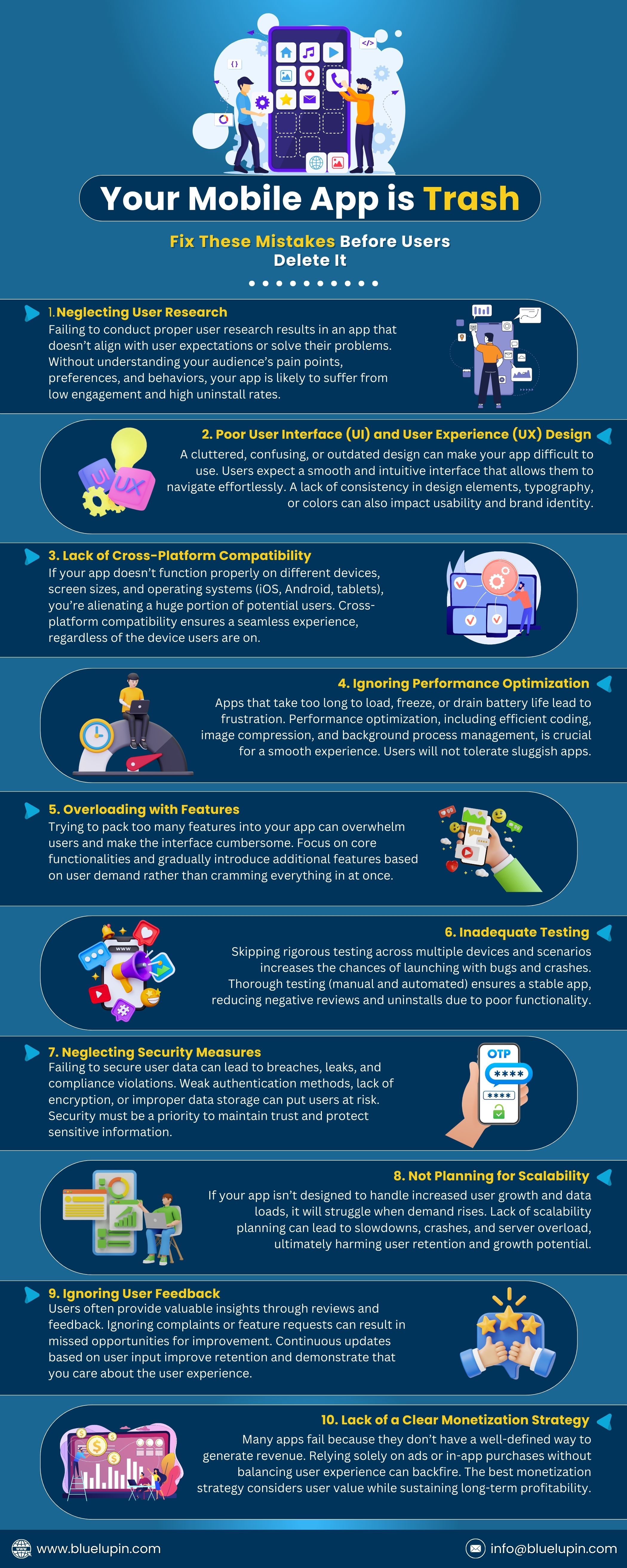
If you want to avoid the common mistakes that make mobile apps fail, check out our infographic below that highlights what NOT to do when building a mobile app.
Conclusion
Building a mobile app that users love is not about cramming in trendy features or following fleeting design fads. It’s about solving real problems, creating a seamless experience, and continually improving based on user needs. Successful mobile application development requires a balance between usability, security, and ongoing enhancements to keep users engaged long-term.