

Picture an ops agent asked to fix a failing build. It can read the deploy config so it understands the environment. Halfway through, it decides the quickest fix is to edit that config. From the agent’s point of view, that’s a sensible move. From yours, it just touched production.
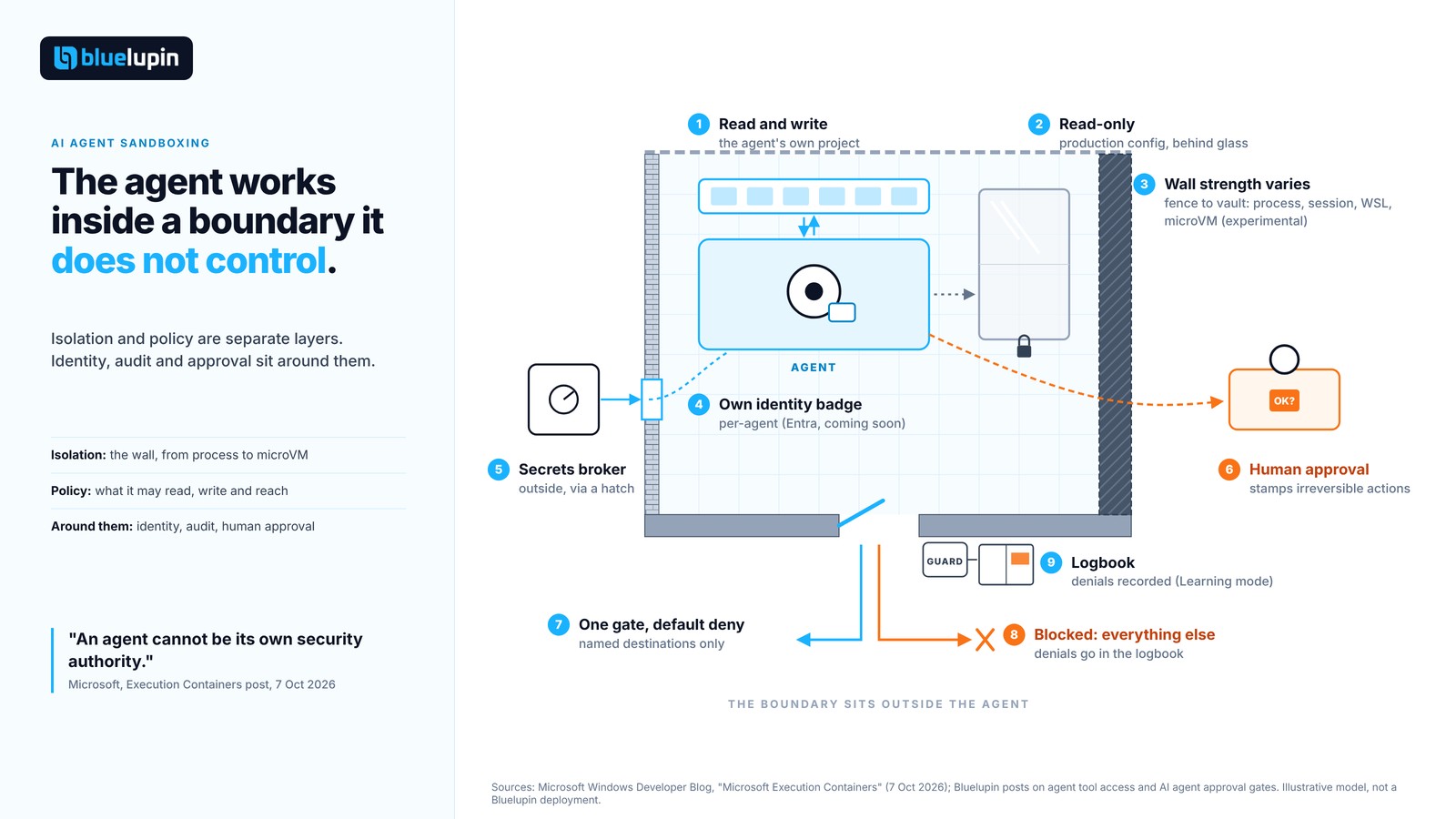
That’s the problem AI agent sandboxing exists to solve. Sandboxing an AI agent means enforcing what it can touch (files, network, tools, UI, secrets) from outside the agent, so the model, its generated code, or a plugin cannot widen its own access. Isolation strength and access policy are separate decisions, and enterprises need both, plus identity and audit.
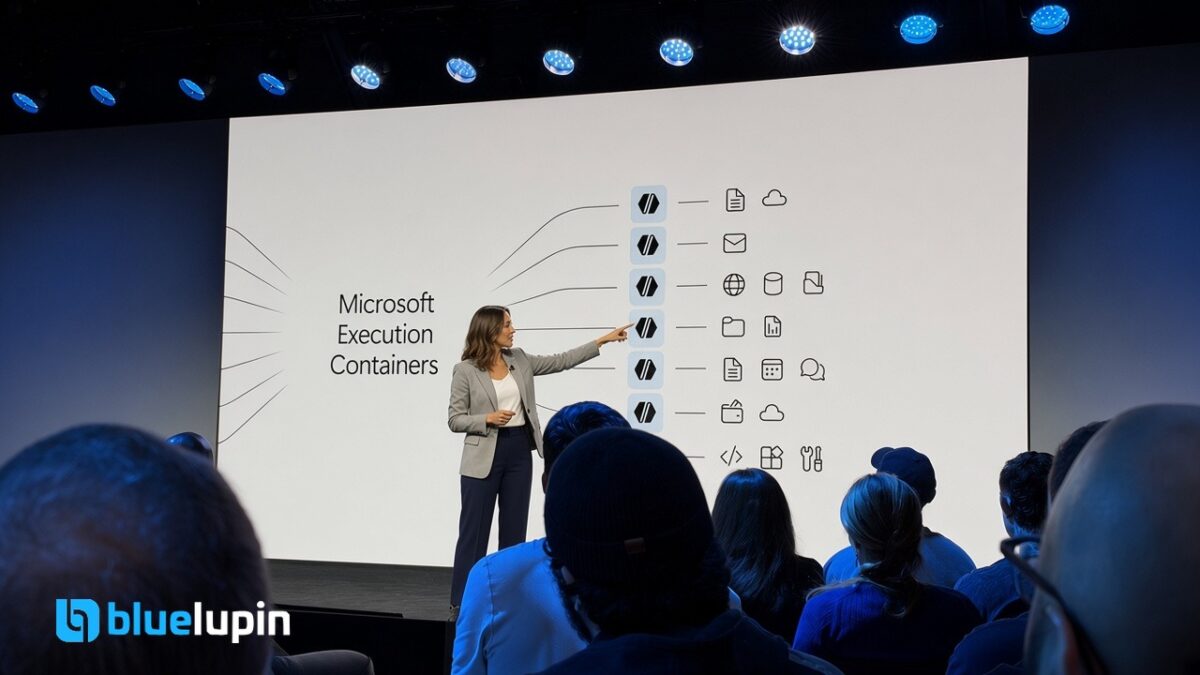
Microsoft used almost the same scenario (a coding agent, a website, and a production server config) when it announced Microsoft Execution Containers (MXC) on 7 October 2026. Their summary line is the clearest one we’ve read on the topic: “An agent cannot be its own security authority.”
An agent cannot be its own security authority.
Microsoft, Windows Developer Blog, 7 October 2026
This post is not a rollout story. MXC is days old and we haven’t run it. What we can do is lay out the sandbox requirements we keep running into when designing AI products, where the current options fall short, and how MXC maps to those gaps, based on what Microsoft has published.
Why agents need a boundary they cannot argue with
Most agent safety work happens in the reasoning layer: system prompts, tool descriptions, typed decisions, approval steps. Those layers decide what an agent should ask to do. They can still be wrong. A prompt injection gets through, a tool gets called with a path nobody expected, a generated script does something the model never mentioned.
A sandbox is the layer that doesn’t negotiate. It decides what the agent physically can do when everything above it misses. In our Jev vs prompt caching post we argued for a typed gate that decides. The sandbox is what contains the damage when the gate decides wrong.
The requirements we see in enterprise AI products
These come up in nearly every agent design conversation once a security lead joins the call. None of them is exotic. Together, they’re hard to satisfy with one tool.
File, network, and tool scoping
An agent needs three kinds of path: places it may write, places it may only read, and everything else, which it should not see at all. Network is the same, and the safe default is deny. An agent that can reach any HTTPS endpoint can send your data anywhere, however strong the box around it.
For knowledge-heavy agents, read scoping matters as much as write scoping. What the agent saw shapes what it says, which is a thread we followed in Enterprise AI knowledge platform agents can cite.
Secrets stay outside the agent
The agent should never hold a long-lived credential it can print, log, or paste into a tool call. Brokers and short-lived scoped tokens sit above the sandbox. We covered that pattern in Architecting agent tool access without handing over the keys. The sandbox’s job is narrower: make sure the agent can’t wander off and find credentials on disk or in the environment.
Per-agent identity
When something goes wrong, “the user did it” is the wrong answer if an agent acted on the user’s behalf. Security teams want to restrict a misbehaving agent without locking out the employee it works for. We’ll go deeper on non-human identity in a separate post. For sandboxing, the requirement is simple: the boundary should know which agent it’s holding.
Denials are logged and attributable
Every blocked file write or network call should land in a log with the agent’s name on it. Denials are the cheapest early warning you’ll get, and they’re the evidence an auditor or a board will ask for. That ties directly to the evidence thinking in our DPDP proof packs post. Government and enterprise buyers in India increasingly ask “who did what”, and agent-level denial logs are part of a good answer. They are not, on their own, a compliance claim.
Blast radius per workload
A coding helper running linters and an agent executing code pulled from a user upload are different risk classes. They shouldn’t share the same boundary strength by default.
Human approval for risky actions
Some actions should pause for a person no matter how well contained the agent is: moving money, sending to citizens, deleting records. That’s the job of AI agent approval gates. The sandbox is the floor under the gate, not a replacement for it.
Cost and latency
Agent loops are chatty. A VM boot or a heavy container start on every tool call kills responsiveness, and teams quietly loosen the boundary to get speed back.
Developer friction
Least privilege sounds easy until you try to write the policy for an agent whose needs you don’t fully know yet. Too tight and the agent fails in confusing ways. Too loose and you’ve built a sandbox with an open door.
Where today’s approaches fall short
Each option below is good at something. None covers the whole list.
Docker and plain containers
Familiar, fast, and well tooled. Containers share the host kernel, though, so a kernel escape is an escape. File and network policy is possible, but it’s yours to design and maintain, and nothing in a container knows about agent identity or organisational policy.
gVisor and Firecracker microVMs
Stronger isolation. gVisor intercepts system calls in a user-space kernel. Firecracker gives each workload its own small VM and kernel. You pay in operational weight (guest images, kernels, syscall overhead), and you still get isolation, not policy. A microVM with open outbound internet can leak more than a locked-down container. A stronger box does not decide what the box allows.
Cloud sandboxes
Hosted code-execution sandboxes are good for running generated code remotely. They don’t help with the growing class of agents that run on an employee’s laptop, next to that person’s files, mail, and browser.
OS permission prompts
Asking the user “allow this app to access Documents?” hands the security call to the person least placed to judge it, at the moment they least want to think about it. Prompt fatigue sets in quickly, and there’s no central policy for IT to set.
What Microsoft Execution Containers (MXC) is
Everything in this section comes from Microsoft’s 7 October 2026 announcement. Availability will move, so re-check it before you plan around any detail.
Per Microsoft, MXC is generally available and is “a policy-driven execution layer for untrusted code or dynamically generated workloads.” You can contain model-generated output, plugins, tools, the agent harness, or the entire agent. Developers declare the resources a workload needs, such as files and network destinations, and MXC enforces that boundary at runtime. The policy sits outside the workload’s control, so the agent can’t grant itself more access.
Developers integrate through one JSON configuration schema and a multi-language SDK. MXC maps the requested controls to backends on Windows, macOS, or Linux. Microsoft lists four backends:
- Process container (Windows 11, macOS, Linux): lightweight containment for responsive workloads such as generated code and tool execution. It uses AppContainer on Windows, Seatbelt on macOS, and Bubblewrap on Linux.
- Session container (Windows 11 only): runs the agent under a separate Windows account and session, with its own desktop, clipboard, UI, and input, for long-running agents that need a desktop.
- WSL container (Windows 11 only): a Linux environment through WSL for Linux-first toolchains.
- MicroVM (Windows 11 and Linux, experimental): a hardware-backed virtualised boundary for higher-risk workloads.
Policy covers five areas: containment (which environment), process (command, arguments, working directory, environment), file system (writable, read-only, and blocked locations), network (inbound and outbound, including host loopback), and user interface (desktop access).
There are three modes. Enforcement blocks ungranted access. Learning blocks it and records it. Permissive allows it and records it, to help you write a policy. Microsoft notes that the activity report behind Learning and Permissive is available only on Windows, for process containers.
Some enterprise pieces are announced but not shipped:
- Intune management of MXC process containers on Windows 11 is coming soon, letting IT layer organisational policy on top of what the developer declared.
- Microsoft Entra distinguishing agent activity from user activity in Agent 365 is coming soon.
- Windows 365 Cloud PC support for MXC is described as generally available.
Microsoft also says NVIDIA has integrated OpenShell into MXC, adding policy controls for file and inference access, advanced network controls, credential management, and OCSF auditing for enterprises. It names GitHub Copilot, OpenClaw, OpenAI Codex, Replit, LM Studio, and Unsloth AI as already supporting MXC, with others announced. That is Microsoft’s list, not an independent check.
How MXC maps to the requirements
This is the table we’d bring to a design review. The MXC column reflects Microsoft’s announcement, not Bluelupin testing.
| Requirement | Plain containers (Docker) | gVisor | Firecracker microVM / cloud sandbox | OS permission prompts | MXC (per Microsoft, Oct 2026) |
|---|---|---|---|---|---|
| File scoping | You build it | You build it | You build it | Partial, per prompt | Native (write, read-only, blocked) |
| Network egress control | You build it | You build it | You build it | Rarely | Native (inbound, outbound, loopback) |
| Secrets handling | You build it | You build it | You build it | n/a | Via NVIDIA OpenShell; keep a broker |
| Per-agent identity | n/a | n/a | n/a | n/a | Entra integration announced, coming soon |
| Audit of denials | You build it | Partial | You build it | n/a | Activity report (Windows process containers); OCSF via OpenShell |
| Isolation strength | Shared kernel | User-space kernel | Own kernel per workload | Process-level | Varies by backend; microVM is experimental |
| Runs on employee devices | Sometimes | Rarely | No (cloud) | Yes | Yes, plus Windows 365 |
| Policy authoring help | No | No | No | No | Learning and Permissive modes |
| Org-wide policy management | You build it | You build it | Vendor console | MDM, coarse | Intune announced, coming soon |
| Maturity | Mature | Mature | Mature | Mature | New (GA Oct 2026) |
The cells worth a second look are in the MXC column: native file and network policy, help writing least-privilege policy, and a story for agents on the device. The weakest cells are the ones that say “coming soon”.
Open questions and limits we would test first
If we were evaluating MXC for a client agent, these are the questions we’d want answered on one real workload before going further:
- What ships when. Intune policy and Entra agent identity are announced, not available. A plan that depends on them needs a fallback.
- Strongest isolation is experimental. For untrusted code today, you’re choosing between process, session, and WSL containers, or running your own microVM layer.
- Cross-platform parity. Session containers and activity reports are Windows-only. Mac- and Linux-heavy teams should check what they actually get.
- Server-side agents. Plenty of enterprise agents run in your own cloud, not on a device or Cloud PC. How MXC fits there is worth testing directly.
- Policy drift. Learning and Permissive modes are useful during authoring. Someone needs to own switching them off.
- Audit export. OCSF auditing is mentioned through NVIDIA OpenShell. What reaches your SIEM without it?
- Secrets. The core announcement covers files, network, and UI. Credential management comes via OpenShell. We’d keep a broker regardless.
- Performance and cost. Microsoft publishes no figures. Measure startup and per-call overhead on your own loop before committing.
A sandbox checklist for your next agent feature
Paste this into your next design review:
- Name the boundary owner: who writes and approves the policy.
- Network is default-deny, with named destinations.
- Read and write paths are explicit, and everything else is blocked.
- Secrets are brokered, never stored in the agent’s environment.
- The agent has its own identity, separate from the user.
- Denials are logged and attributable to that agent.
- Untrusted code gets a stronger backend than trusted tools.
- Irreversible actions go through an approval gate, sandbox or not.
FAQ
What is AI agent sandboxing?
Running an agent inside a boundary that limits which files, network destinations, tools, and UI it can reach. The boundary is enforced outside the agent, so it can’t grant itself more access.
What is Microsoft Execution Containers (MXC)?
Per Microsoft’s 7 October 2026 announcement, it’s a policy-driven containment layer for AI agents and generated code. Developers declare allowed resources in a JSON policy, and MXC enforces them using process, session, WSL, or (experimental) microVM backends.
Is a Docker container enough to sandbox an AI agent?
Sometimes, for trusted, low-risk tools with locked-down network and file access. Containers share the host kernel and don’t give you agent identity or organisational policy, so untrusted code usually needs a stronger boundary.
Does sandboxing replace human approval for agent actions?
No. A sandbox limits what an agent can do. An approval gate decides whether a specific risky action should run. You need both.
How do you write a least-privilege policy for an agent?
Observe what it accesses, then tighten. MXC’s Learning and Permissive modes record attempted access for exactly this, though Microsoft says activity reports are Windows-only for now.
Why does an AI agent need its own identity?
So security teams can audit and restrict the agent without blocking the employee it works for.
Close
Containment, identity, and approval are three different layers. MXC looks like a credible new option for the first, and partly for the second once the Entra work ships. It doesn’t replace your credential broker or your approval gates.
If you’re designing an agent feature now, pick one workload, write down what it should be able to read, write, and reach, and see how close each sandbox option gets you. The gaps in that list will tell you more than any vendor table, including ours.