

A made-up example. A customer asks a product’s assistant to move their delivery slot. The assistant replies with three paragraphs of open times, ending in “reply 1, 2 or 3”. The same answer could be one card with three slots and a Confirm button. I’d rather tap than type a number back. On 11 Nov 2026, Google released version 1.0 of Google A2UI, a protocol for that second kind of reply (Google’s announcement).
Based on Google’s announcement and the A2UI documentation, checked 12 Nov 2026. Versions are moving quickly, so check each platform’s page before you plan.
Google A2UI is an open protocol that lets a product’s AI assistant answer with interactive screens, such as a form to confirm or a card to compare options. The assistant describes what to show, and your app draws it with components you have approved. Google released the first stable version, A2UI 1.0, on 11 Nov 2026.
What is in Google A2UI 1.0
Google calls A2UI 1.0 “the first stable version of our open protocol for generative UI” (announcement). The A2UI site calls it a framework, so you will see both words (a2ui.org).
For drawing screens, Google lists renderers for React, Angular and Lit on the web, Flutter for mobile, web and desktop, and SwiftUI for iPhone. Jetpack Compose on Android supports the earlier 0.9.1 version today (SDKs page), and Google says 1.0 support is “coming soon” (announcement). On the agent side there are SDKs for Python, TypeScript and Dart. The project is open source under the Apache 2.0 license (GitHub).
Google says companies such as Atlassian, Alation, Bloomberg and ByteDance are already building with it (announcement). Atlassian, Google says, “is bringing” A2UI to Jira, so an agent can ask a follow-up with a card inside a work item. ByteDance’s Lynx supports 0.9 today and is adapting to 1.0. These are Google’s examples, and Bluelupin has no part in them.
How it works, in plain terms
First, the assistant sends a description of the screen, and your app draws it from a list of components you have approved. The documentation calls that list a catalog. A production app defines its own catalog, so the assistant is limited to the components and visual language that already exist in your product (v1.0 specification). The assistant picks the pieces, and your design team made the pieces.
Second, the description travels as data. The A2UI site says screens are sent as “declarative JSON data with two-way bindings, never executable code” (a2ui.org). The specification also says functions that need a person’s gesture cannot be triggered by the agent (specification).
Third, version 1.0 adds two-way function calls. The screen can ask the assistant for fresh data, and the assistant can call functions your app has approved. Google’s example is a reservation picker that checks availability on the spot. Accessibility labels are part of the protocol too, and each renderer maps them to the platform’s own accessibility features (announcement).
When a form or card is more useful
The examples below come from Google. The judgment about when to use them is mine.
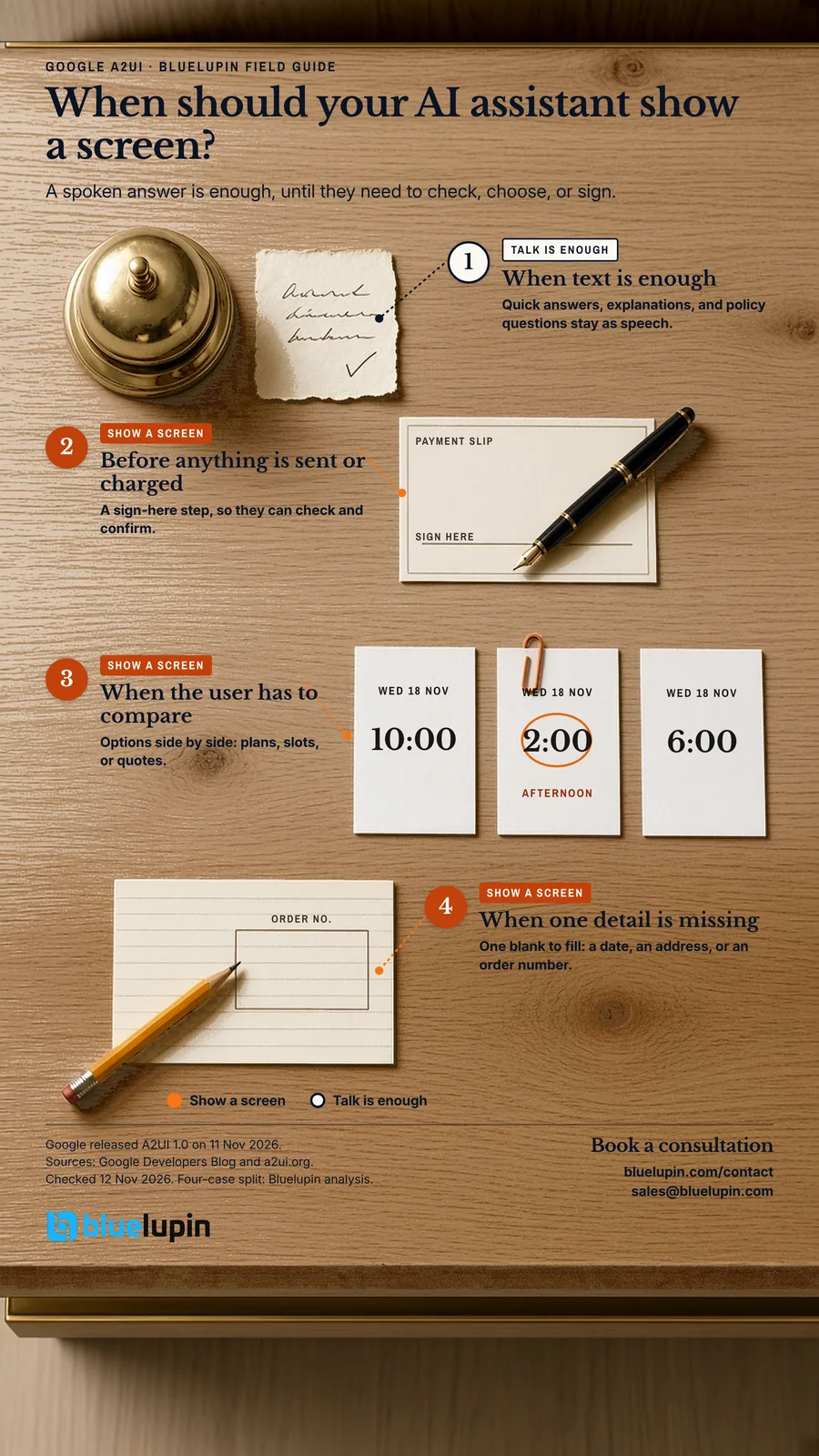
Before anything is sent or charged
A review card lets the person check the details, edit them, and then confirm. Google’s own example is Gemini Notebook. Asked for a slide deck, it shows a card asking about format and focus, then an editable review card before it builds anything (announcement). For anything that sends money or messages, this is where I’d start.
When the user has to compare
Plans, delivery slots and quotes read better side by side. Google’s announcement calls text “a poor way to compare three products”. Cards with the same fields in the same places let someone scan the options at a glance.
When the assistant is missing one detail
Many conversations stall on one missing fact: a date, an address, an order number. One small form collects it in a single step. Atlassian’s planned Jira follow-up card, as Google describes it, is this pattern inside a work item.
When text is enough
In my view, quick answers, explanations and policy questions should stay as text. A screen for every reply slows people down.
Your app, Claude or Gemini Enterprise: what changes
Where the screen appears changes who styles it and which version runs.
- Your web or iPhone app: your own components and theme, on A2UI 1.0 (specification).
- Your Android app: your own components, on 0.9.1 today (SDKs page), with 1.0 coming soon (announcement).
- Claude, through an MCP App: you bundle the A2UI web renderer inside an MCP App, and it runs in Claude’s sandboxed frame. The version depends on what you bundle (A2UI in MCP Apps guide, Claude on MCP Apps).
- Gemini Enterprise, as a registered agent: an admin registers your agent, and its screens render with Gemini Enterprise’s built-in styling. It supports an earlier A2UI version today (Google Cloud docs), and Google says the move to 1.0 is in progress (announcement).
MCP stands for Model Context Protocol, and MCP Apps lets an assistant show interactive views. Google says the web and Flutter renderers work inside MCP Apps, so A2UI screens can appear in assistants such as Claude and Gemini Enterprise (Google Cloud guide). There, your screen sits inside their interface.
If you are comparing A2UI and MCP Apps, Google’s earlier post describes the tradeoff: A2UI keeps design consistent but limits you to a component set, while MCP Apps allow custom web views with more design and performance tradeoffs (Google on A2UI and MCP Apps).
How this differs from assistants calling your app
We have covered letting Siri use your iPhone app and letting AI assistants use your Android app. Both are about an assistant on the phone calling actions your app offers, sometimes without opening the app.
A2UI covers a different job: your own assistant draws screens for the person using your product, in your app or in assistants that support MCP Apps. A product could use both.
What I’d decide before building
These are my recommendations. Google does not prescribe them.
- Start from where people stall. Pick two or three moments from support or sales conversations where customers get stuck, and build screens for those first.
- Choose the components. Decide which components the assistant may use, starting from your existing design system.
- Put a confirm step in front of anything that matters. Payments, account changes and anything sent to another person should wait for a tap. Keep server-side checks as well, and keep the agent’s access narrow.
- Check versions for every platform you ship. Web and iPhone can use 1.0. Android Compose is on 0.9.1 for now. Gemini Enterprise is on an earlier version (announcement).
- Plan how you will watch it. Track which screens appear, what people tap and where they leave. The A2UI roadmap notes that user actions already flow back to the agent.
Common questions
What is Google A2UI?
An open protocol from Google that lets AI agents answer with interactive screens, such as forms, cards and charts. The agent describes the screen, and the app draws it with its own approved components (announcement).
Does A2UI work on Android and iPhone?
Yes. There are official renderers for SwiftUI on iPhone, Jetpack Compose on Android, and Flutter across platforms. Google says the Compose renderer supports version 0.9.1 today (SDKs page), with 1.0 support coming soon (announcement).
Can A2UI screens appear inside Claude or Gemini Enterprise?
Yes, in assistants that support MCP Apps, such as Claude and Gemini Enterprise, using the web or Flutter renderer inside an MCP App. Gemini Enterprise can also host registered A2UI agents, on an earlier A2UI version today (Google Cloud docs).
Is it safe to let an AI assistant draw screens in my app?
A2UI sends screen descriptions as data, and the agent can only use components and functions your app has approved. Actions that need a tap stay with the user (specification). I’d still keep server checks and a confirm step for payments.
How is A2UI different from Siri App Intents or Android AppFunctions?
App Intents and AppFunctions let an assistant on the phone call actions your app offers. A2UI lets your own assistant show screens to the person using your product. They solve different problems and can work together.
Planning an assistant inside your product?
If you’re planning an assistant inside your product, Bluelupin can help you choose the moments that need a screen and build the agent and the components behind them through our AI agent development work. Bring a few real conversations where customers get stuck. Book a consultation or write to sales@bluelupin.com.